附录 F — gt包-整洁的建立表格
R表格包太多太乱了让人不知道用哪个。gt包是Posit出品,秉承ggplot2理念,再加上它的扩展包gtsummary包(学术),gto包(导出到word,PPT),tablespan包(导出到Excel),会出现一统的趋势。
我们可以将展示表格视为仅用于输出,不希望再次将其用作输入。其他功能包括注释、表格元素样式和文本转换,这些都有助于更清晰地传达主题内容。
注意,我们要展示的表格最好不再参与之后的处理,而是要展示的最终结果。
F.1 gt包的简单表格入门
我们用islands数据集来演示gt包的基本用法。islands数据集实际为一个数字型的向量,包含世界各地岛屿的面积(平方英里)。我们将其转换为数据框以便使用gt包。
# A tibble: 10 × 2
   name           size
   <chr>         <dbl>
 1 Asia          16988
 2 Africa        11506
 3 North America  9390
 4 South America  6795
 5 Antarctica     5500
 6 Europe         3745
 7 Australia      2968
 8 Greenland       840
 9 New Guinea      306
10 Borneo 280接下来,我们使用gt()函数将数据框转换为gt表格对象。
# Create a gt table
gt_tbl <- gt(islands_tbl)
gt_tbl # print the gt table as html widget| name | size |
|---|---|
| Asia | 16988 |
| Africa | 11506 |
| North America | 9390 |
| South America | 6795 |
| Antarctica | 5500 |
| Europe | 3745 |
| Australia | 2968 |
| Greenland | 840 |
| New Guinea | 306 |
| Borneo | 280 |
在以上表格的基础上,根据 图 F.1 为gt_tbl对象添加对应的部分。
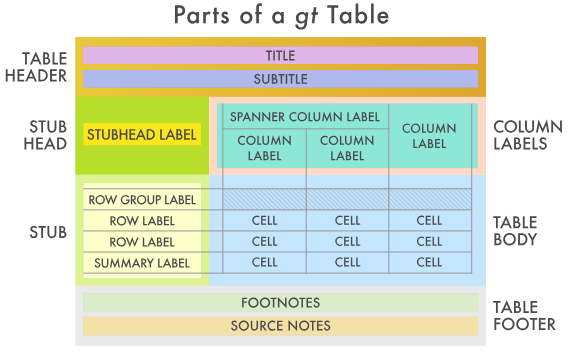
大致包括一下几个部分。
F.2 表头(Table Header)
可选;包含标题和可能的副标题。gt::tab_header()。我们可以使用md()函数在表头的部分使用markdown格式。
# 直接添加标题
gt_tbl_header <- gt_tbl |>
  tab_header(
    title = "Large Landmasses of the World",
    subtitle = "The top ten largest are presented"
  )
gt_tbl_header| Large Landmasses of the World | |
| The top ten largest are presented | |
| name | size |
|---|---|
| Asia | 16988 |
| Africa | 11506 |
| North America | 9390 |
| South America | 6795 |
| Antarctica | 5500 |
| Europe | 3745 |
| Australia | 2968 |
| Greenland | 840 |
| New Guinea | 306 |
| Borneo | 280 |
# 使用markdown格式
gt_tbl_header <- gt_tbl |>
  tab_header(
    title = md("**Large Landmasses of the World**"), # 加粗
    subtitle = md("The *top ten* largest are presented") # 斜体
  )
gt_tbl_header| Large Landmasses of the World | |
| The top ten largest are presented | |
| name | size |
|---|---|
| Asia | 16988 |
| Africa | 11506 |
| North America | 9390 |
| South America | 6795 |
| Antarctica | 5500 |
| Europe | 3745 |
| Australia | 2968 |
| Greenland | 840 |
| New Guinea | 306 |
| Borneo | 280 |
F.4 存根与存根标题(the Stub and the Stub Head)
可选;包含行标签,可选择性地置于行组内,行组可带有行组标签,且在存在汇总时可能包含汇总标签。gt::tab_stubhead()。
Stub表侧栏是表格左侧的区域,包含行标签,可能包含行组标签和汇总标签。这些子部分可以按行组顺序进行分组。表侧栏标题为描述表侧栏的标签提供位置。表侧栏是可选的,因为在某些情况下表侧栏并不实用(例如,之前展示的表格在没有表侧栏的情况下也能正常显示)。
gt_tbl_stab <- islands_tbl |>
  gt(rowname_col = "name") |> # stub列
  tab_stubhead(label = "landmass") # stub列名
gt_tbl_stab| landmass | size |
|---|---|
| Asia | 16988 |
| Africa | 11506 |
| North America | 9390 |
| South America | 6795 |
| Antarctica | 5500 |
| Europe | 3745 |
| Australia | 2968 |
| Greenland | 840 |
| New Guinea | 306 |
| Borneo | 280 |
这里需要特别注意的一点是,在没有存根列时,表格有两列(列标签为 name 和 size ),但现在第 1 列(唯一的一列)是 size 。也可以理解为stub列是不算在gt表格的主体中的。
再添加了stub列后,我们就可以使用tab_row_group()函数将行划分为不同的组别,并在每个组的上方显示组标签。
# 添加gt表格各个组件
gt_tbl <-
  gt_tbl_stab |>
  tab_header(
    title = "Large Landmasses of the World",
    subtitle = "The top ten largest are presented"
  ) |>
  tab_source_note(
    source_note = "Source: The World Almanac and Book of Facts, 1975, page 406."
  ) |>
  tab_source_note(
    source_note = md(
      "Reference: McNeil, D. R. (1977) *Interactive Data Analysis*. Wiley."
    )
  ) |>
  tab_footnote(
    footnote = md("The **largest** by area."),
    locations = cells_body(
      columns = size,
      rows = largest
    )
  ) |>
  tab_footnote(
    footnote = "The lowest by population.",
    locations = cells_body(
      columns = size,
      rows = contains("arc")
    )
  )
gt_tbl| Large Landmasses of the World | |
| The top ten largest are presented | |
| landmass | size |
|---|---|
| Asia | 1 16988 |
| Africa | 11506 |
| North America | 9390 |
| South America | 6795 |
| Antarctica | 2 5500 |
| Europe | 3745 |
| Australia | 2968 |
| Greenland | 840 |
| New Guinea | 306 |
| Borneo | 280 |
| 1 The largest by area. | |
| 2 The lowest by population. | |
| Source: The World Almanac and Book of Facts, 1975, page 406. | |
| Reference: McNeil, D. R. (1977) Interactive Data Analysis. Wiley. | |
# 行分组
gt_tbl_rowgroup <- gt_tbl |>
  tab_row_group(
    label = md("**continent**"),
    rows = 1:6
  ) |>
  tab_row_group(
    label = "country",
    rows = c("Australia", "Greenland")
  ) |>
  tab_row_group(
    label = "Subregion",
    rows = c("New Guinea", "Borneo")
  )

gt_tbl_rowgroup| Large Landmasses of the World | |
| The top ten largest are presented | |
| landmass | size |
|---|---|
| Subregion | |
| New Guinea | 306 |
| Borneo | 280 |
| country | |
| Australia | 2968 |
| Greenland | 840 |
| continent | |
| Asia | 1 16988 |
| Africa | 11506 |
| North America | 9390 |
| South America | 6795 |
| Antarctica | 2 5500 |
| Europe | 3745 |
| 1 The largest by area. | |
| 2 The lowest by population. | |
| Source: The World Almanac and Book of Facts, 1975, page 406. | |
| Reference: McNeil, D. R. (1977) Interactive Data Analysis. Wiley. | |
创建行分组的另一种方法是在输入数据表中包含一个分组名称的列。以我们上述的 islands_tbl 为例,若在适当行中设置包含 continent 、 country 和 subregion 类别的 groupname 列,当使用 gt() 函数的 groupname_col 参数时(例如 gt(islands_tbl, rowname_col = "name", groupname_col = "groupname") |> ... ),就会生成行分组。这样就不再需要使用 tab_row_group() 。
这种在列中提供分组名称的策略有时更具优势,因为我们可以依赖诸如 dplyr 中的函数来生成类别(例如使用 case_when() 或 if_else() )。
具体例子可参看gt()函数的帮助说明。
F.5 列标签(Column Labels)
包含列标签,可选择位于跨列标签下方。
表格的列标签部分至少包含列及其列标签。上一个示例中有一个单独的列: size 。正如在存根(Stub)中一样,我们可以创建称为跨列的分组,这些分组包含一个或多个列。tab_spanner()函数的功能正是如此。
我们使用包含更多列的airquality为例。
   Ozone Solar.R Wind Temp Month Day Year
1     41     190  7.4   67     5   1 1973
2     36     118  8.0   72     5   2 1973
3     12     149 12.6   74     5   3 1973
4     18     313 11.5   62     5   4 1973
5     NA      NA 14.3   56     5   5 1973
6     28      NA 14.9   66     5   6 1973
7     23     299  8.6   65     5   7 1973
8     19      99 13.8   59     5   8 1973
9      8      19 20.1   61     5   9 1973
10    NA     194  8.6   69     5  10 1973
# Create a display table using the `airquality_m`
# dataset; arrange columns into groups
gt_tbl_air <- airquality_m |>
gt() |>
tab_header(
title = "New York Air Quality Measurements",
subtitle = "Daily measurements in New York City (May 1-10, 1973)"
) |>
tab_spanner(
label = "Time",
columns = c(Year, Month, Day)
) |>
tab_spanner(
label = "Measurement",
columns = c(Ozone, Solar.R, Wind, Temp)
)
gt_tbl_air| New York Air Quality Measurements | ||||||
| Daily measurements in New York City (May 1-10, 1973) | ||||||
Measurement
|
Time
|
|||||
|---|---|---|---|---|---|---|
| Ozone | Solar.R | Wind | Temp | Year | Month | Day |
| 41 | 190 | 7.4 | 67 | 1973 | 5 | 1 |
| 36 | 118 | 8.0 | 72 | 1973 | 5 | 2 |
| 12 | 149 | 12.6 | 74 | 1973 | 5 | 3 |
| 18 | 313 | 11.5 | 62 | 1973 | 5 | 4 |
| NA | NA | 14.3 | 56 | 1973 | 5 | 5 |
| 28 | NA | 14.9 | 66 | 1973 | 5 | 6 |
| 23 | 299 | 8.6 | 65 | 1973 | 5 | 7 |
| 19 | 99 | 13.8 | 59 | 1973 | 5 | 8 |
| 8 | 19 | 20.1 | 61 | 1973 | 5 | 9 |
| NA | 194 | 8.6 | 69 | 1973 | 5 | 10 |
以上gt_tbl_ari表格已经比较美观,但我们还可以进一步美化:
- 将
Time列移至序列的开头: 使用cols_move_to_start()。 - 自定义列标签,使其更具描述性: 使用
cols_label()。
gt_tbl_air_modify <- gt_tbl_air |>
cols_move_to_start(
columns = c(Year, Month, Day)
) |>
cols_label(
Ozone = html("Ozone, <br>ppbV"),
Solar.R = html("Solar.R, <br>cal/m<sup>2</sup>"),
Wind = html("Wind, <br>mph"),
Temp = html("Temp, <br>°F")
)
gt_tbl_air_modify| New York Air Quality Measurements | ||||||
| Daily measurements in New York City (May 1-10, 1973) | ||||||
Time
|
Measurement
|
|||||
|---|---|---|---|---|---|---|
| Year | Month | Day | Ozone, ppbV |
Solar.R, cal/m2 |
Wind, mph |
Temp, °F |
| 1973 | 5 | 1 | 41 | 190 | 7.4 | 67 |
| 1973 | 5 | 2 | 36 | 118 | 8.0 | 72 |
| 1973 | 5 | 3 | 12 | 149 | 12.6 | 74 |
| 1973 | 5 | 4 | 18 | 313 | 11.5 | 62 |
| 1973 | 5 | 5 | NA | NA | 14.3 | 56 |
| 1973 | 5 | 6 | 28 | NA | 14.9 | 66 |
| 1973 | 5 | 7 | 23 | 299 | 8.6 | 65 |
| 1973 | 5 | 8 | 19 | 99 | 13.8 | 59 |
| 1973 | 5 | 9 | 8 | 19 | 20.1 | 61 |
| 1973 | 5 | 10 | NA | 194 | 8.6 | 69 |