27  机器学习概览

重要

我们将数据分为表格数据和非表格数据的依据,与如何选择合适的模型有关。通常,大多数建模项目都涉及表格数据(或能够被有效表示为表格形式的数据)。针对非表格数据的模型则非常专业化。虽然这些机器学习方法在社交媒体上被广泛讨论,但它们往往并非处理表格数据的最佳方案。

确定最佳数据表示形式的过程被称为特征工程,这是机器学习中的关键任务,却常常被忽视。我们将在 章节 30章节 31 中详细探讨各种特征工程方法(在数据已转换为表格格式后进行)。

统计学习(statistical learning), 也有数据挖掘(data mining),机器学习(machine learning)等称呼。 主要目的是用一些计算机算法从大量数据中发现知识。 方兴未艾的数据科学就以统计学习为重要支柱。 方法分为有监督(supervised)学习与无监督(unsupervised)学习。

无监督学习方法如聚类问题、主成分分析、异常点识别、购物篮问题等。

有监督学习即统计中回归分析和判别分析解决的问题, 现在又有回归判别数、随机森林、lasso、梯度提升法、支持向量机、 神经网络、贝叶斯网络、排序算法等许多方法。

无监督学习在给了数据之后, 直接从数据中发现规律, 比如聚类分析是发现数据中的聚集和分组现象, 购物篮分析是从数据中找到更多的共同出现的条目 (比如购买啤酒的用户也有较大可能购买火腿肠)。

有监督学习方法众多。 通常,需要把数据分为训练样本(training sample)和测试样本(testing sample), 训练样本的因变量(数值型或分类型)是已知的, 根据训练样本中自变量和因变量的关系训练出一个回归函数, 此函数以自变量为输入, 可以输出因变量的预测值。

训练出的函数有可能是有简单表达式的(例如,logistic回归)、 有参数众多的表达式的(如神经网络), 也有可能是依赖于所有训练样本而无法写出表达式的(例如k近邻分类)。

27.1 偏差与方差平衡

对于回归问题,我们经常需要使用均方误差(MSE) \(E|Ey-\hat{y}|^2\) 来衡量精度。对于分类问题,经常使用分类准确率等来衡量精度。 均方误差可以分解为以下公式:

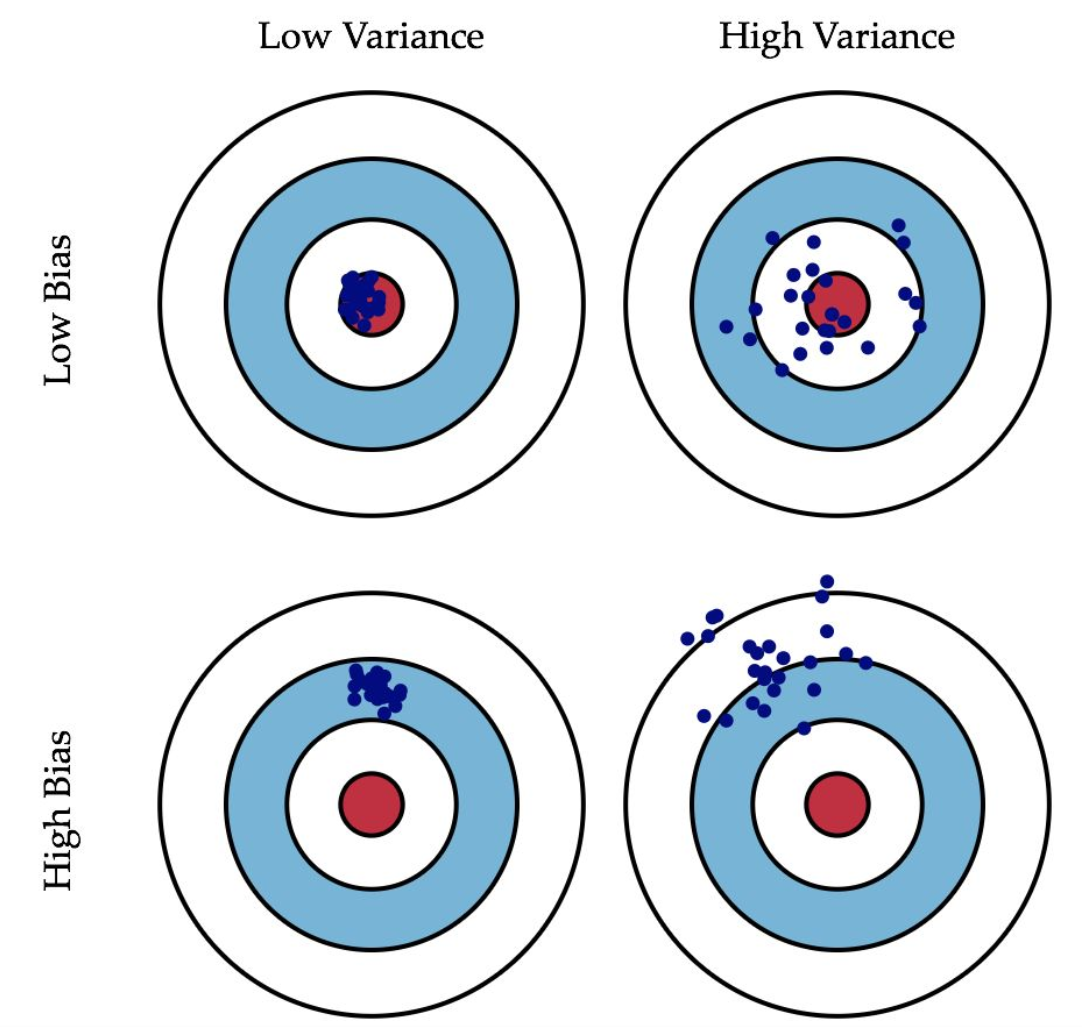
方差衡量预测值之间的离散程度;偏差衡量预测值与真实值之间的误差。方差越大,数据的分布越分散;偏差越大,预测越不准确。如下图所示

\[ 均方误差=方差+偏差^2 \]

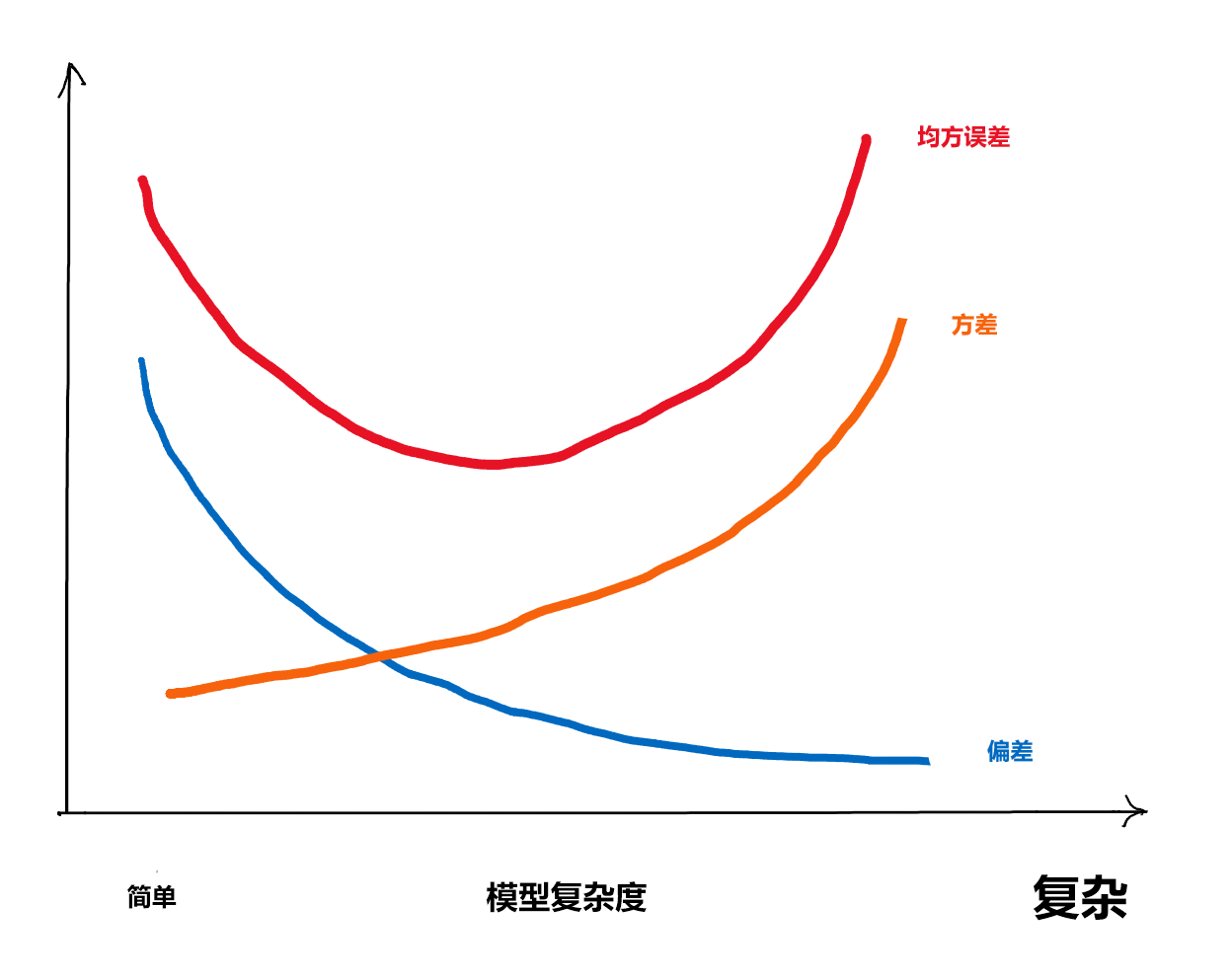
图 27.1: 方差、偏差、均方误差与模型复杂度间的关系

如果选择的模型过于简单, 即模型复杂度过低, 则偏差会很大, 方差会很小; 随着模型的复杂度提升,模型的预测能力越来越强,会使得偏差逐渐降低;同时,如果模型过于复杂,会使方差过大,同样导致模型的预测能力不足(过拟合)。

复杂程度在线性回归中就是自变量个数,在一元曲线拟合中就是曲线的不光滑程度。在其它指标类似的情况下,简单的模型更稳定、可解释更好,所以统计学特别重视模型的简化。

因此在建模实践中通常追求在偏差与方差间的平衡:优先选择尽可能简单的模型以获得更稳定、可解释的结果,并通过交叉验证、正则化或信息准则等方法来客观选择或约束模型复杂度,防止欠拟合与过拟合。

27.2 交叉验证

即使是在从训练样本中训练(估计)回归函数时,也需要适当地选择模型的复杂度。仅考虑对训练数据的拟合程度是不够的,这会造成过度拟合问题。

为了相对客观地度量模型的预报误差,假设训练样本有个观测,可以留出第一个观测不用,用剩余的 \(n-1\) 个观测建模,然后预测第一个观测的因变量值,得到一个误差;对每个观测都这样做,就可以得到个误差。这样的方法叫做留一法。这种方法想法简单,但除了样本量特别小的情况以外,这种方法从计算效率和统计性质上都是不好的,

更常用的是十折或五折交叉验证。假设训练集有个观测,将其用随机抽样方法随机地均分成份,保留第1份不用,将其余9份合并在一起用来建模,然后预测第一份;对每一份都这样做,并在每一份上计算评估预测精度的指标,取这10份上的精度指标的平均值作为预测精度指标,这样的模型预测精度评估方法叫做十折交叉验证(ten-fold cross validation)方法。

因为用来预测的数据没有用来建模,交叉验证得到的误差估计更准确。

rsamplevfold_cv可以生成这样的划分,并对每一份,可以用analysis()assessment()分别提取建模用部分和验证用部分。机器学习算法函数一般都包含了用交叉验证方法调参的功能,不需要用户自己去划分数据。

交叉验证和重采样的具体描述在 章节 34 中有详细介绍。

27.3 回归问题的评判指标

对于回归类的问题,设自变量为 \(x_i\) ,因变量为 \(y_i\) ,用模型得到的因变量预测值(估计值) \(\hat{y}_i, i = 1, 2, ..., n\),则常用的回归评判指标是均方根误差,如下 式 27.1 所示:

\[ RMSE=\sqrt{\frac{1}{n}\sum_{i=1}^n(y_i-\hat{y}_i)^2} \tag{27.1}\]

值得注意的是,为了避免过拟合,计算 \(\hat{y}_i\) 所用的模型参数,应该从与上述数据无关的训练集中获取。

类似的评判指标还有平均绝对误差(MAE)1决定系数(coefficient of determination)2等。

27.4 判别问题的评判指标

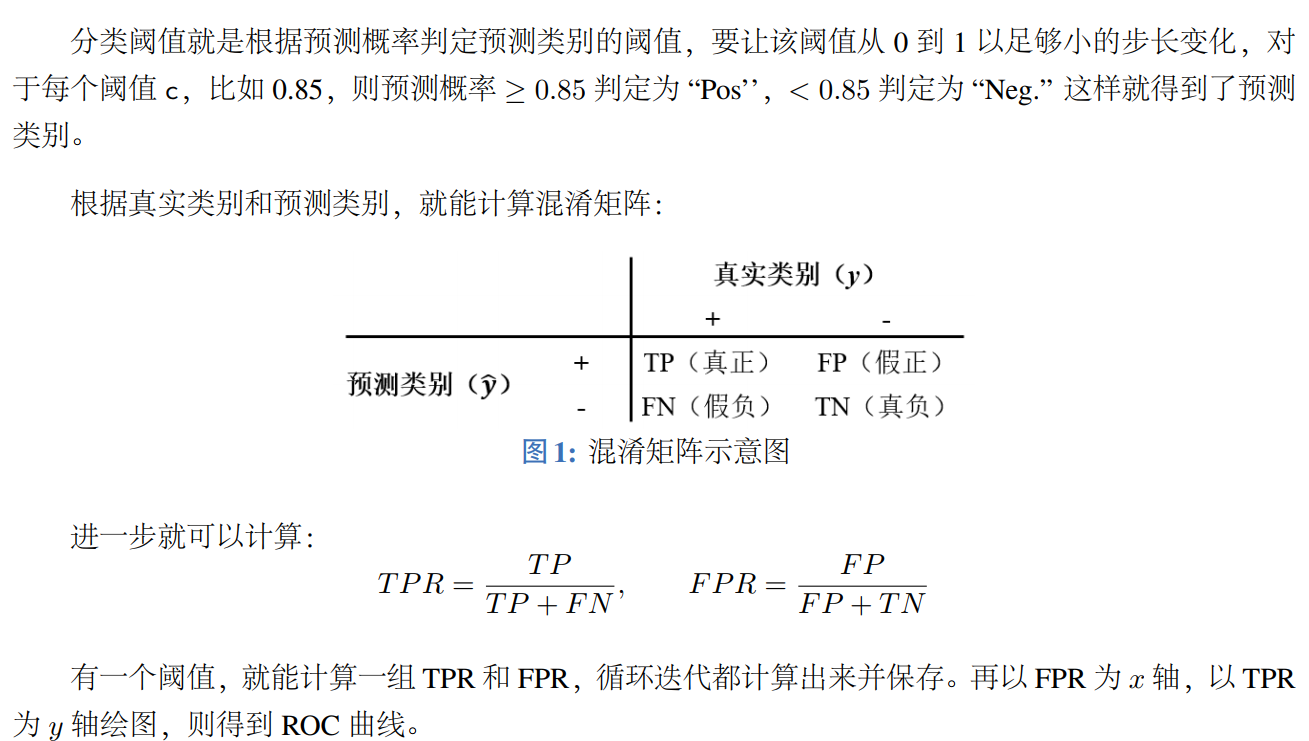
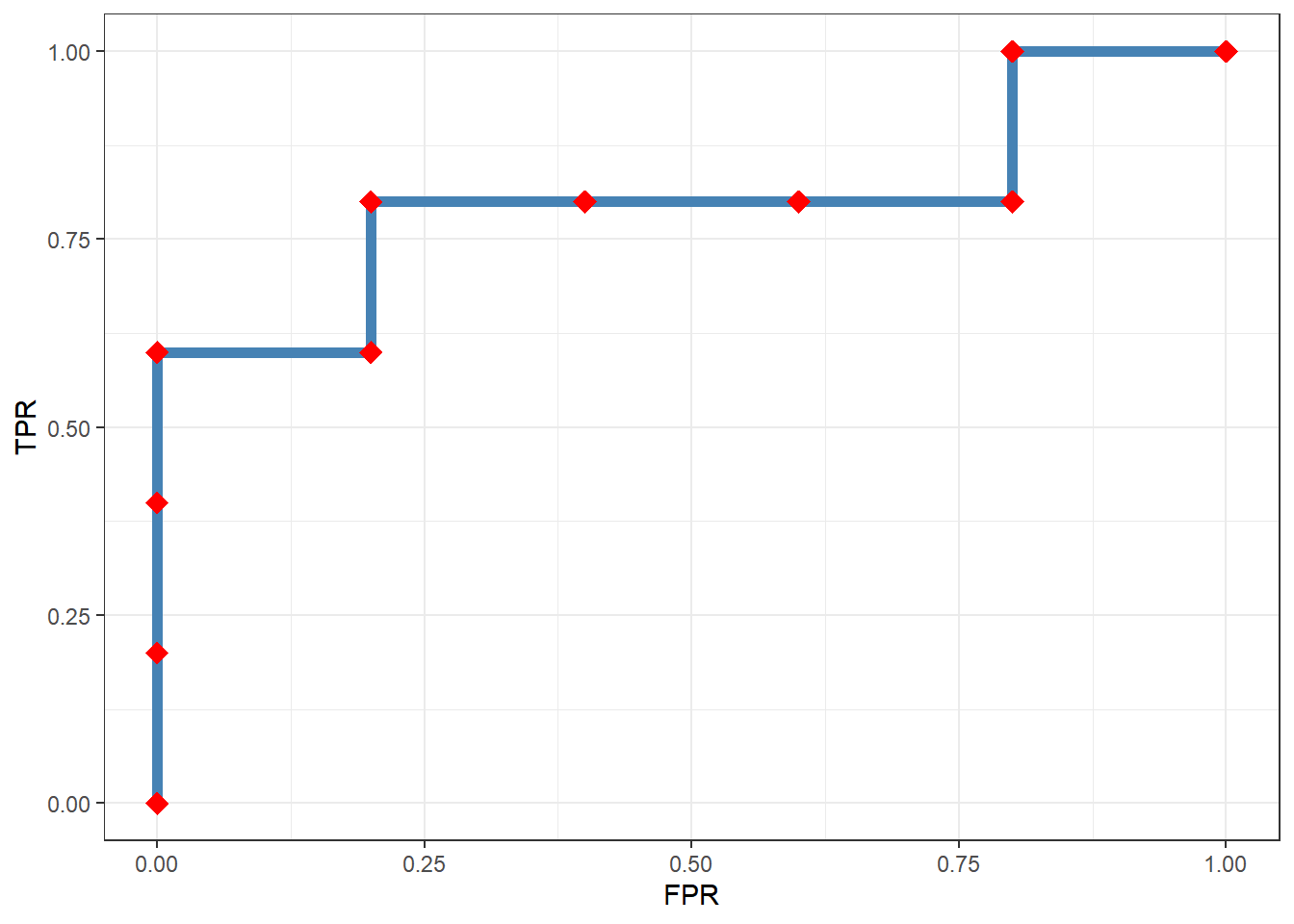
有监督学习问题的因变量取为分类值时,这样的问题称为判别问题。这类问题常用ROC曲线(receiver operating characteristic curve)来评判模型的预测能力。如下 图 27.2 (b) 所示,ROC曲线横轴是假阳率(false positive rate),纵轴是真阳率(true positive rate),曲线的形状反映了模型的预测能力:

  • ROC曲线越靠近左上角,说明模型的预测能力越好,因为它能够准确地将正例预测为正例,也能够准确地将负例预测为负例。
  • 也可以用ROC曲线的下方的面积,即AUC(area under curve)值来衡量模型的预测能力,AUC值越大,说明模型的预测能力越好。
(a) 混淆矩阵及其计算方法
(b) ROC曲线示例
图 27.2: 混淆矩阵和ROC曲线

27.5 机器学习的基本过程

我们使用deliveries数据集来说明机器学习的基本过程。

library(tidymodels)
library(patchwork)
tidymodels_prefer()

load("D:/Document/0.Study R/0.R4DS/data/RData/deliveries.RData")
glimpse(deliveries)
Rows: 10,012
Columns: 31
$ time_to_delivery <dbl> 16.1106, 22.9466, 30.2882, 33.4266, 27.2255, 19.6459,…
$ hour             <dbl> 11.899, 19.230, 18.374, 15.836, 19.619, 12.952, 15.47…
$ day              <fct> Thu, Tue, Fri, Thu, Fri, Sat, Sun, Thu, Fri, Sun, Tue…
$ distance         <dbl> 3.15, 3.69, 2.06, 5.97, 2.52, 3.35, 2.46, 2.21, 2.62,…
$ item_01          <int> 0, 0, 0, 0, 0, 1, 0, 0, 0, 0, 0, 0, 0, 1, 0, 0, 0, 0,…
$ item_02          <int> 0, 0, 0, 0, 0, 0, 0, 0, 0, 2, 0, 0, 0, 1, 0, 0, 0, 1,…
$ item_03          <int> 2, 0, 0, 0, 0, 0, 1, 1, 0, 1, 0, 0, 0, 0, 1, 0, 0, 0,…
$ item_04          <int> 0, 0, 0, 0, 1, 1, 1, 0, 0, 0, 1, 0, 1, 0, 0, 0, 0, 0,…
$ item_05          <int> 0, 0, 1, 0, 0, 0, 0, 0, 0, 0, 0, 0, 0, 0, 0, 0, 0, 0,…
$ item_06          <int> 0, 0, 0, 0, 0, 0, 0, 1, 0, 0, 0, 0, 0, 0, 0, 1, 0, 0,…
$ item_07          <int> 0, 0, 0, 0, 1, 1, 0, 0, 1, 0, 0, 0, 0, 0, 0, 1, 0, 0,…
$ item_08          <int> 0, 0, 0, 0, 0, 0, 0, 1, 0, 0, 1, 0, 1, 0, 0, 0, 1, 0,…
$ item_09          <int> 0, 0, 0, 0, 0, 1, 0, 0, 0, 0, 0, 0, 1, 0, 1, 0, 0, 0,…
$ item_10          <int> 1, 0, 0, 0, 0, 0, 0, 0, 0, 0, 0, 1, 0, 0, 0, 0, 0, 0,…
$ item_11          <int> 1, 0, 0, 0, 1, 1, 0, 0, 0, 0, 0, 0, 0, 0, 0, 0, 0, 0,…
$ item_12          <int> 0, 0, 0, 1, 0, 0, 0, 0, 0, 1, 0, 0, 0, 0, 0, 0, 0, 0,…
$ item_13          <int> 0, 0, 0, 0, 0, 0, 0, 0, 0, 0, 0, 0, 0, 0, 0, 0, 0, 0,…
$ item_14          <int> 0, 0, 0, 0, 1, 0, 0, 0, 0, 0, 0, 0, 0, 0, 0, 0, 0, 0,…
$ item_15          <int> 0, 0, 0, 0, 0, 0, 0, 0, 1, 0, 0, 0, 0, 0, 0, 0, 0, 0,…
$ item_16          <int> 0, 0, 0, 0, 0, 0, 0, 0, 0, 0, 0, 0, 0, 0, 0, 0, 0, 0,…
$ item_17          <int> 0, 0, 0, 0, 0, 0, 0, 0, 0, 1, 0, 0, 0, 0, 0, 0, 0, 0,…
$ item_18          <int> 0, 1, 0, 0, 0, 0, 0, 0, 0, 1, 0, 0, 0, 0, 0, 1, 1, 0,…
$ item_19          <int> 0, 0, 0, 0, 0, 0, 0, 0, 0, 0, 0, 0, 0, 0, 0, 0, 0, 0,…
$ item_20          <int> 0, 0, 1, 0, 0, 0, 0, 0, 0, 0, 0, 0, 0, 0, 0, 0, 0, 0,…
$ item_21          <int> 0, 0, 0, 0, 0, 0, 0, 1, 0, 0, 0, 0, 0, 0, 0, 0, 0, 0,…
$ item_22          <int> 0, 0, 0, 0, 0, 1, 1, 0, 0, 1, 0, 0, 0, 1, 0, 0, 0, 0,…
$ item_23          <int> 0, 0, 0, 0, 0, 0, 0, 0, 0, 0, 0, 0, 0, 0, 0, 0, 0, 0,…
$ item_24          <int> 0, 0, 1, 0, 0, 1, 0, 0, 0, 0, 0, 0, 0, 0, 0, 0, 0, 0,…
$ item_25          <int> 0, 0, 0, 0, 0, 0, 0, 0, 0, 0, 1, 0, 0, 0, 0, 0, 0, 1,…
$ item_26          <int> 0, 0, 0, 0, 0, 0, 0, 0, 1, 0, 0, 1, 0, 0, 0, 0, 0, 0,…
$ item_27          <int> 0, 0, 0, 1, 1, 0, 0, 0, 0, 0, 0, 1, 1, 0, 0, 0, 0, 0,…
该示例重点关注预测食品配送时间(即从下单到收到食品的时间)。数据集包含某特定餐厅的 10,012 笔订单。预测变量包括:

  • hour: 订单的时间,以十进制小时表示。

  • day: 下单日期是星期几。

  • distance: 餐厅与送餐地点之间的大致距离。

  • item_01~27: 一组用于统计订单中不同菜品数量的27个预测变量。

结果变量为:time_to_delivery,以分钟为单位。

27.6 数据划分

我们大部分的时间都会花在处理训练集样本上。

章节 28 有针对数据划分的详细说明。
set.seed(991)
delivery_split <- initial_validation_split(
  deliveries,
  prop = c(0.6, 0.2), # 60%训练集,20%测试集,20%验证集
  strata = time_to_delivery # 分层抽样,确保每个数据集中的time_to_delivery分布相似
)

# split data
delivery_train <- training(delivery_split)
delivery_test <- testing(delivery_split)
delivery_val <- validation(delivery_split)

27.7 EDA-recipe

章节 31章节 30 有针对数据预处理的详细说明。

EDA主要是帮助我们对数据有一个初步的了解,发现数据中的一些问题,并为后续的数据预处理和建模提供指导。EDA通常包括(但不仅限于)以下几个步骤,且通常以可视化的形式进行展示:

  1. 数据概览:查看数据的结构、变量类型和缺失值情况。
  2. 单变量分析:对每个变量进行描述性统计分析和可视化,了解其分布情况。
  3. 多变量分析:探索多个变量之间的关系,识别潜在的模式和趋势。
代码
day_cols <- c(
  "#000000FF",
  "#24FF24FF",
  "#009292FF",
  "#B66DFFFF",
  "#6DB6FFFF",
  "#920000FF",
  "#FFB6DBFF"
)

delivery_dist <-
  delivery_train %>%
  ggplot(aes(x = distance, time_to_delivery)) +
  geom_point(alpha = 1 / 10, cex = 1) +
  labs(y = "Time Until Delivery (min)", x = "Distance (miles)", title = "(a)") +
  # This function creates the smooth trend line. The `se` option shuts off the
  # confidence band around the line; too much information to put into one plot.
  geom_smooth(se = FALSE, col = "red")

delivery_day <-
  delivery_train %>%
  ggplot(aes(x = day, time_to_delivery, col = day)) +
  geom_boxplot(show.legend = FALSE) +
  labs(y = "Time Until Delivery (min)", x = NULL, title = "(c)") +
  scale_color_manual(values = day_cols)

delivery_time <-
  delivery_train %>%
  ggplot(aes(x = hour, time_to_delivery)) +
  labs(
    y = "Time Until Delivery (min)",
    x = "Order Time (decimal hours)",
    title = "(b)"
  ) +
  geom_point(alpha = 1 / 10, cex = 1) +
  geom_smooth(se = FALSE, col = "red")

delivery_time_day <-
  delivery_train %>%
  ggplot(aes(x = hour, time_to_delivery, col = day)) +
  labs(
    y = "Time Until Delivery (min)",
    x = "Order Time (decimal hours)",
    title = "(d)"
  ) +
  # With `col = day`, the trends will be estimated separately for each value of 'day'.
  geom_smooth(se = FALSE) +
  scale_color_manual(values = day_cols)

(delivery_dist + delivery_time) /
  # Row 2
  (delivery_day + delivery_time_day) +
  # Consolidate the legends
  plot_layout(guides = 'collect') &
  # Place the legend at the bottom
  theme(legend.title = element_blank(), legend.position = "bottom")
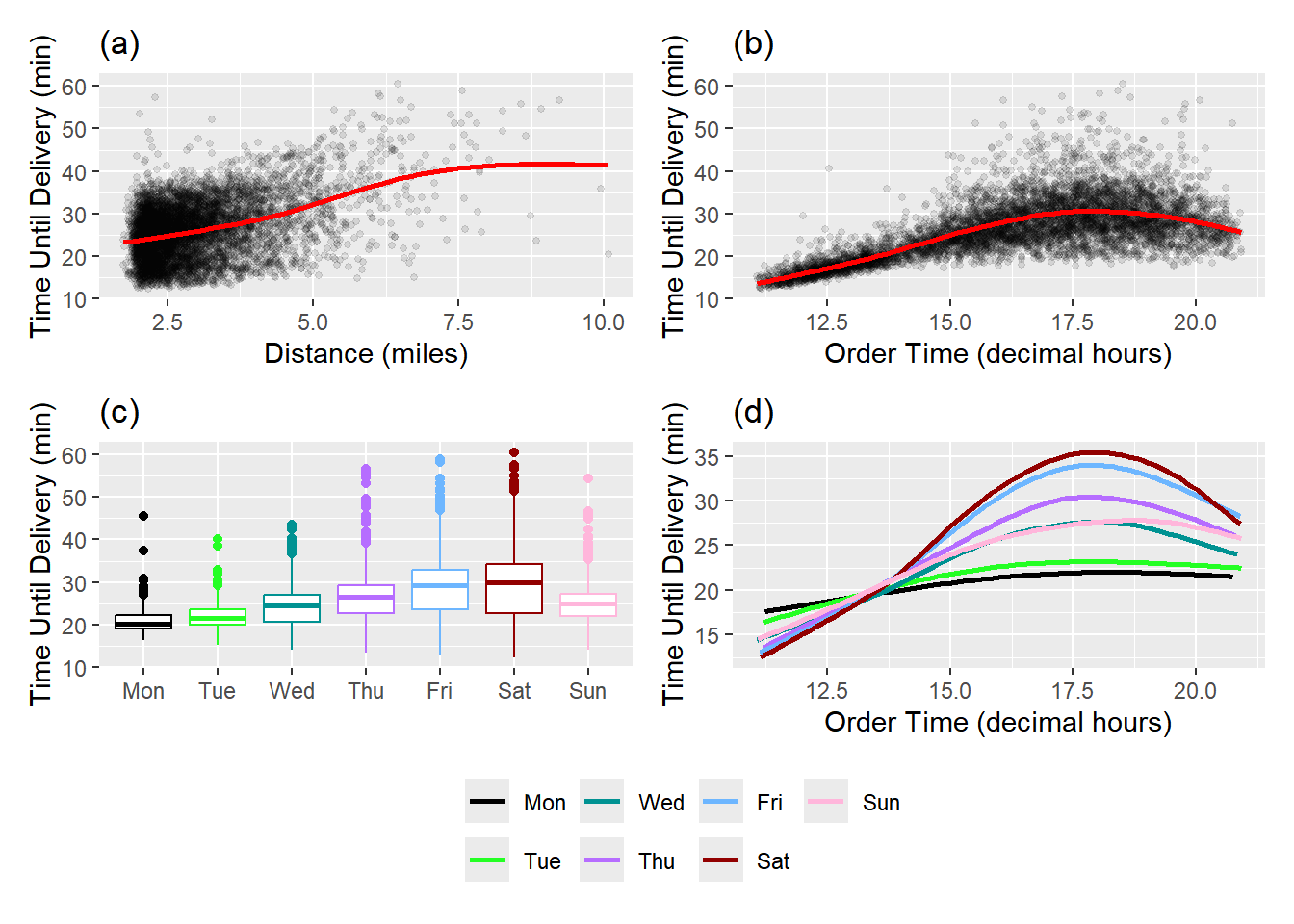
图 27.3: 订单时间、订单日期和配送距离与交货时间之间的关系

图 27.3 显示了订单时间、订单日期和配送距离与交货时间之间的关系。

  • 图 27.3 (a) 显示了配送距离与交货时间之间的关系。可以看到,随着配送距离的增加,交货时间也呈现出增加的趋势,但这种关系并不是线性的,而是存在一个非线性的模式。

  • 图 27.3 (b) 显示了订单时间与交货时间之间的关系。可以看到,订单时间与交货时间之间也存在非线性的关系,尤其是在一天中的某些时间段(如午餐和晚餐高峰期)交货时间明显增加。

  • 图 27.3 (c) 显示了订单日期与交货时间之间的关系。可以看到,不同日期的订单交货时间存在差异,可能是由于不同日期的订单量和配送情况不同所导致的。

  • 图 27.3 (d) 显示了订单时间和订单日期与交货时间之间的关系。可以看到,订单时间与交货时间之间的非线性关系在不同日期表现各异,这可能是由于不同日期的订单量和配送情况不同所导致的。

此外,我们还关注变量item_01item_27,这些变量表示订单中不同菜单项的数量。目标变量是time_to_delivery,表示从下单到收到食品的时间(以分钟为单位),那么我们可能还需关注某个订单如果包含这些菜单项,是否会影响配送时间。

  1. 建立一个自定函数,接收数据集和我们感兴趣的统计量(本例中我们关注置信区间,所以关注平均值),函数中:
  • 使用pivot_longer()函数将数据从宽格式转换为长格式,以便更容易地进行分组和计算。
  • 使用pivot_wider()函数将数据重新转换为宽格式,以便更好地展示结果。
  1. 在训练集上使用该函数,测试函数是否正确运行。

  2. 对训练集使用重采样,对每个重采样都使用该函数,计算每个菜单项的统计量。

代码
time_ratios <- function(x) {
  x |>
    pivot_longer(
      cols = starts_with("item_"),
      names_to = "predictor",
      values_to = "count"
    ) |>
    mutate(ordered = ifelse(count > 0, "yes", "no")) |>
    summarise(
      mean = mean(time_to_delivery),
      .by = c(predictor, ordered)
    ) |>
    pivot_wider(
      id_cols = predictor,
      names_from = ordered,
      values_from = mean
    ) |>
    mutate(ratio = yes / no) |>
    select(term = predictor, estimate = ratio)
}

# use the function on the training set
time_ratios(delivery_train)
# A tibble: 27 × 2
   term    estimate
   <chr>      <dbl>
 1 item_01     1.07
 2 item_02     1.01
 3 item_03     1.01
 4 item_04     1.00
 5 item_05     1.00
 6 item_06     1.02
 7 item_07     1.02
 8 item_08     1.01
 9 item_09     1.02
10 item_10     1.08
# ℹ 17 more rows

结果值为1.07意味着当订单中至少包含该商品一次时,交货时间将增加7%。

使用重采样来评估这些估计值的稳定性,我们采用90%的置信度。主要使用到的函数有:

  • bootstraps(),该函数用于生成重采样数据集。
  • analysis(),该函数用于提取重采样数据集中的分析数据(即原始数据)。
  • int_pctl(),该函数接收重采样(例如bootstraps`)数据集,并计算每个重采样的统计量,然后计算这些统计量的百分位数,以形成置信区间。
代码
# resample the training set
set.seed(624)
resample_data <- delivery_train |>
  select(time_to_delivery, starts_with("item_")) |>
  bootstraps(times = 1000)
resample_data
# Bootstrap sampling 
# A tibble: 1,000 × 2
   splits              id           
   <list>              <chr>        
 1 <split [6004/2227]> Bootstrap0001
 2 <split [6004/2197]> Bootstrap0002
 3 <split [6004/2156]> Bootstrap0003
 4 <split [6004/2210]> Bootstrap0004
 5 <split [6004/2208]> Bootstrap0005
 6 <split [6004/2227]> Bootstrap0006
 7 <split [6004/2202]> Bootstrap0007
 8 <split [6004/2204]> Bootstrap0008
 9 <split [6004/2151]> Bootstrap0009
10 <split [6004/2229]> Bootstrap0010
# ℹ 990 more rows
代码
# extract the analysis data
resample_ratios <- resample_data |>
  mutate(stats = map(splits, \(x) time_ratios(analysis(x))))
resample_ratios
# Bootstrap sampling 
# A tibble: 1,000 × 3
   splits              id            stats            
   <list>              <chr>         <list>           
 1 <split [6004/2227]> Bootstrap0001 <tibble [27 × 2]>
 2 <split [6004/2197]> Bootstrap0002 <tibble [27 × 2]>
 3 <split [6004/2156]> Bootstrap0003 <tibble [27 × 2]>
 4 <split [6004/2210]> Bootstrap0004 <tibble [27 × 2]>
 5 <split [6004/2208]> Bootstrap0005 <tibble [27 × 2]>
 6 <split [6004/2227]> Bootstrap0006 <tibble [27 × 2]>
 7 <split [6004/2202]> Bootstrap0007 <tibble [27 × 2]>
 8 <split [6004/2204]> Bootstrap0008 <tibble [27 × 2]>
 9 <split [6004/2151]> Bootstrap0009 <tibble [27 × 2]>
10 <split [6004/2229]> Bootstrap0010 <tibble [27 × 2]>
# ℹ 990 more rows
代码
resample_ratios$stats[[1]] # 查看第一个重采样的结果
# A tibble: 27 × 2
   term    estimate
   <chr>      <dbl>
 1 item_01     1.07
 2 item_02     1.02
 3 item_03     1.01
 4 item_04     1.01
 5 item_05     1.02
 6 item_06     1.01
 7 item_07     1.03
 8 item_08     1.02
 9 item_09     1.03
10 item_10     1.08
# ℹ 17 more rows
代码
# calculate the confidence intervals
resample_ci <- resample_ratios |>
  int_pctl(stats, alpha = 0.1)
resample_ci
# A tibble: 27 × 6
   term    .lower .estimate .upper .alpha .method   
   <chr>    <dbl>     <dbl>  <dbl>  <dbl> <chr>     
 1 item_01  1.05       1.07   1.10    0.1 percentile
 2 item_02  0.995      1.01   1.02    0.1 percentile
 3 item_03  0.994      1.01   1.02    0.1 percentile
 4 item_04  0.988      1.00   1.02    0.1 percentile
 5 item_05  0.988      1.00   1.02    0.1 percentile
 6 item_06  1.00       1.02   1.03    0.1 percentile
 7 item_07  1.01       1.02   1.04    0.1 percentile
 8 item_08  0.994      1.01   1.02    0.1 percentile
 9 item_09  1.00       1.02   1.03    0.1 percentile
10 item_10  1.06       1.08   1.10    0.1 percentile
# ℹ 17 more rows
代码
# plot the results
resample_ci |>
  mutate(
    term = gsub("_0", " ", term),
    term = factor(gsub("_", " ", term)),
    term = reorder(term, .estimate),
    increase = .estimate - 1
  ) |>
  ggplot(aes(increase, term)) +
  geom_vline(xintercept = 0, lty = 2, col = "red") +
  geom_point() +
  geom_errorbar(aes(xmin = .lower - 1, xmax = .upper - 1), width = 1 / 2) +
  scale_x_continuous(labels = scales::percent) +
  labs(y = NULL, x = "交货时间增加") +
  theme(axis.title.y = element_text(hjust = 0.5))

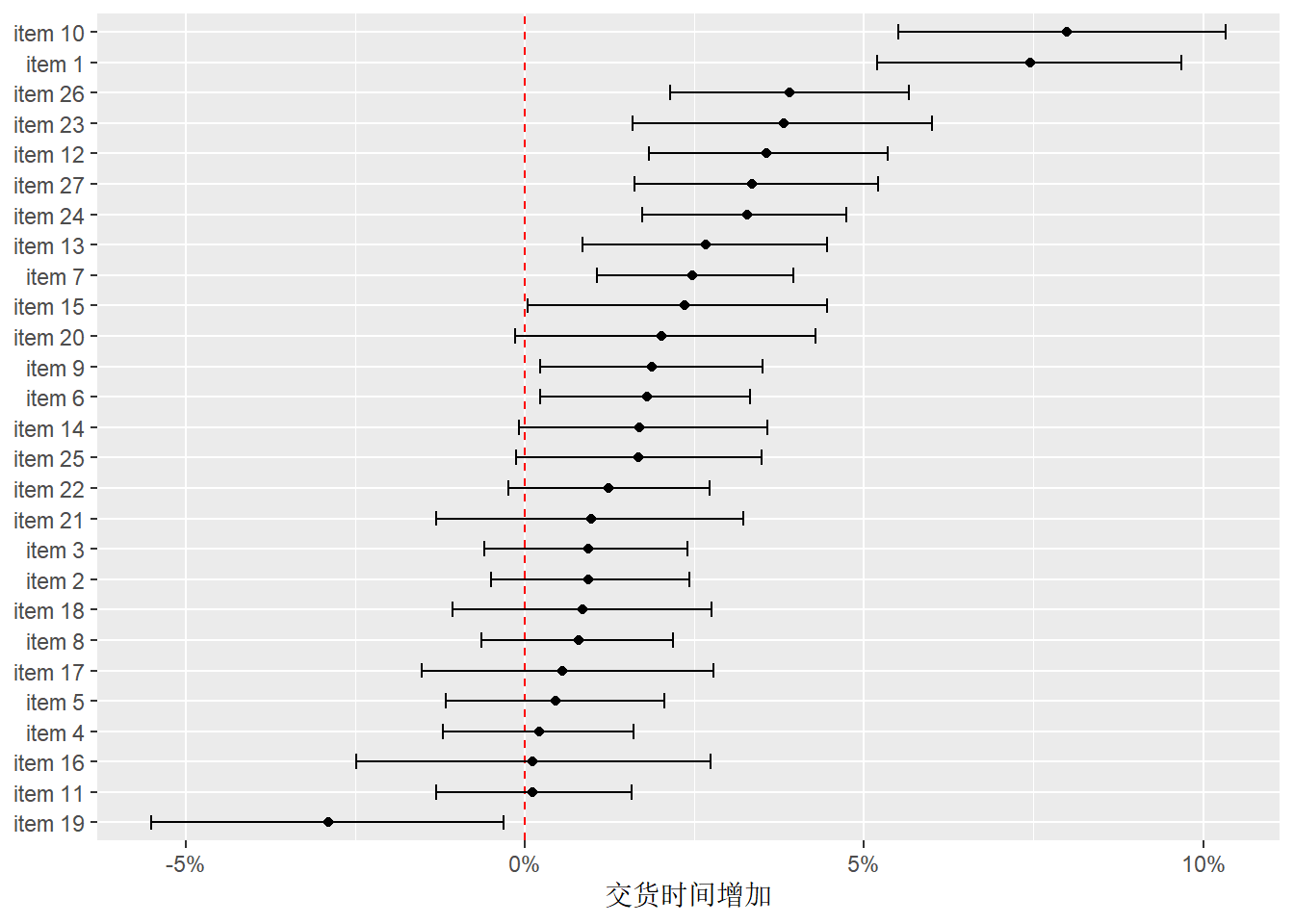
上图显示了每个菜单项对交货时间的影响。红色虚线表示没有影响(即交货时间不变)。

  • 如果某个菜单项的点和误差条完全在红线的右侧,说明该菜单项会显著增加交货时间,如item10item1
  • 如果完全在左侧,则说明会显著减少交货时间,如item19
  • 如果误差条跨过红线,则说明该菜单项对交货时间没有显著影响。

27.7.1 EDA小结

通过EDA,我们发现:

  • 结果变量与订单时间之间存在非线性关系。
  • 这种非线性的关系在不同日期表现各异,这是定性预测变量( 日期 )与另一个变量( 小时 )的非线性函数之间的交互作用效应。
  • 此外,似乎还存在一个与订单距离相关的、额外的非线性效应。

27.8 模型建立和选择

模型建立和选择有几个基本的步骤:

  1. 预处理(recipe)。
  2. 指定模型算法(parsnip)。
  3. 选择合适的指标,评估模型效果(yardstick)。
  4. 模型校准(tune)。

我们使用相对简单的线性回归模型来说明整个过程。

# specify the recipe
spline_rec <- recipe(time_to_delivery ~ ., data = delivery_train) |>
  step_dummy(all_factor_predictors()) |> # one-hot encode categorical predictors
  step_zv(all_predictors()) |> # remove zero-variance predictors
  step_ns(hour, distance, deg_free = 10) |> # natural cubic spline
  step_interact(~ starts_with("hour_"):starts_with("day_")) # interaction terms
spline_rec

# specify the model
lm_reg_spec <- linear_reg()

# create the workflow
lm_reg_wflow <- workflow() |>
  add_recipe(spline_rec) |>
  add_model(lm_reg_spec)
lm_reg_wflow
══ Workflow ════════════════════════════════════════════════════════════════════
Preprocessor: Recipe
Model: linear_reg()

── Preprocessor ────────────────────────────────────────────────────────────────
4 Recipe Steps

• step_dummy()
• step_zv()
• step_ns()
• step_interact()

── Model ───────────────────────────────────────────────────────────────────────
Linear Regression Model Specification (regression)

Computational engine: lm 
# fit the model
lm_reg_fit <- lm_reg_wflow |>
  fit(data = delivery_train)

# model summary-use tidy
tidy(lm_reg_fit)
# A tibble: 114 × 5
   term        estimate std.error statistic  p.value
   <chr>          <dbl>     <dbl>     <dbl>    <dbl>
 1 (Intercept)   13.3      1.58        8.42 4.66e-17
 2 item_01        1.24     0.103      12.1  3.50e-33
 3 item_02        0.646    0.0687      9.41 6.85e-21
 4 item_03        0.731    0.0691     10.6  6.46e-26
 5 item_04        0.282    0.0626      4.50 6.78e- 6
 6 item_05        0.584    0.0787      7.42 1.36e-13
 7 item_06        0.525    0.0720      7.29 3.46e-13
 8 item_07        0.506    0.0710      7.13 1.10e-12
 9 item_08        0.638    0.0672      9.49 3.42e-21
10 item_09        0.737    0.0758      9.72 3.51e-22
# ℹ 104 more rows
# predict on the validation set-use augment
lm_reg_val_pred <- augment(lm_reg_fit, new_data = delivery_val)
lm_reg_val_pred
# A tibble: 2,004 × 33
   .pred   .resid time_to_delivery  hour day   distance item_01 item_02 item_03
   <dbl>    <dbl>            <dbl> <dbl> <fct>    <dbl>   <int>   <int>   <int>
 1  30.1 -2.90                27.2  19.6 Fri       2.52       0       0       0
 2  23.0 -0.918               22.1  15.5 Sun       2.46       0       0       1
 3  28.4 -1.75                26.6  17.0 Thu       2.21       0       0       1
 4  31.0 -0.206               30.8  16.7 Fri       2.62       0       0       0
 5  38.6  2.59                41.2  16.4 Fri       5.16       0       0       0
 6  27.0 -0.00844             27.0  17.1 Thu       2.11       0       0       0
 7  21.6 -0.743               20.8  14.9 Thu       2.22       0       0       0
 8  18.7 -1.75                17.0  12.3 Sat       3.88       0       0       0
 9  26.3 -0.610               25.7  16.6 Thu       2.08       0       0       0
10  19.9 -0.410               19.5  13.5 Tue       3.55       0       0       0
# ℹ 1,994 more rows
# ℹ 24 more variables: item_04 <int>, item_05 <int>, item_06 <int>,
#   item_07 <int>, item_08 <int>, item_09 <int>, item_10 <int>, item_11 <int>,
#   item_12 <int>, item_13 <int>, item_14 <int>, item_15 <int>, item_16 <int>,
#   item_17 <int>, item_18 <int>, item_19 <int>, item_20 <int>, item_21 <int>,
#   item_22 <int>, item_23 <int>, item_24 <int>, item_25 <int>, item_26 <int>,
#   item_27 <int>
# evaluate the model performance on the validation set
reg_metrics <- metric_set(mae)
lm_reg_val_pred |>
  reg_metrics(truth = time_to_delivery, estimate = .pred)
# A tibble: 1 × 3
  .metric .estimator .estimate
  <chr>   <chr>          <dbl>
1 mae     standard        1.61

以上为单独使用验证集的情况,我们知道,验证集可以视为对数据的单次重采样,如此我们可以使用fit_resamples()函数来简便的完成以上操作。

# 生成重采样集
delivery_rs <- validation_set(delivery_split)
class(delivery_rs)
[1] "validation_set" "rset"           "tbl_df"         "tbl"           
[5] "data.frame"    
# 使用fit_resamples()函数
lm_reg_res <- fit_resamples(
  lm_reg_wflow,
  resamples = delivery_rs,
  metrics = reg_metrics,
  control = control_resamples(save_pred = TRUE, save_workflow = TRUE)
)

# 获取结果
collect_predictions(lm_reg_res) # 获取预测值
# A tibble: 2,004 × 5
   .pred id         time_to_delivery  .row .config        
   <dbl> <chr>                 <dbl> <int> <chr>          
 1  30.1 validation             27.2  6005 pre0_mod0_post0
 2  23.0 validation             22.1  6006 pre0_mod0_post0
 3  28.4 validation             26.6  6007 pre0_mod0_post0
 4  31.0 validation             30.8  6008 pre0_mod0_post0
 5  38.6 validation             41.2  6009 pre0_mod0_post0
 6  27.0 validation             27.0  6010 pre0_mod0_post0
 7  21.6 validation             20.8  6011 pre0_mod0_post0
 8  18.7 validation             17.0  6012 pre0_mod0_post0
 9  26.3 validation             25.7  6013 pre0_mod0_post0
10  19.9 validation             19.5  6014 pre0_mod0_post0
# ℹ 1,994 more rows
collect_metrics(lm_reg_res) # 获取评估指标
# A tibble: 1 × 6
  .metric .estimator  mean     n std_err .config        
  <chr>   <chr>      <dbl> <int>   <dbl> <chr>          
1 mae     standard    1.61     1      NA pre0_mod0_post0
# 可视化预测结果
library(probably)
cal_plot_regression(lm_reg_res)

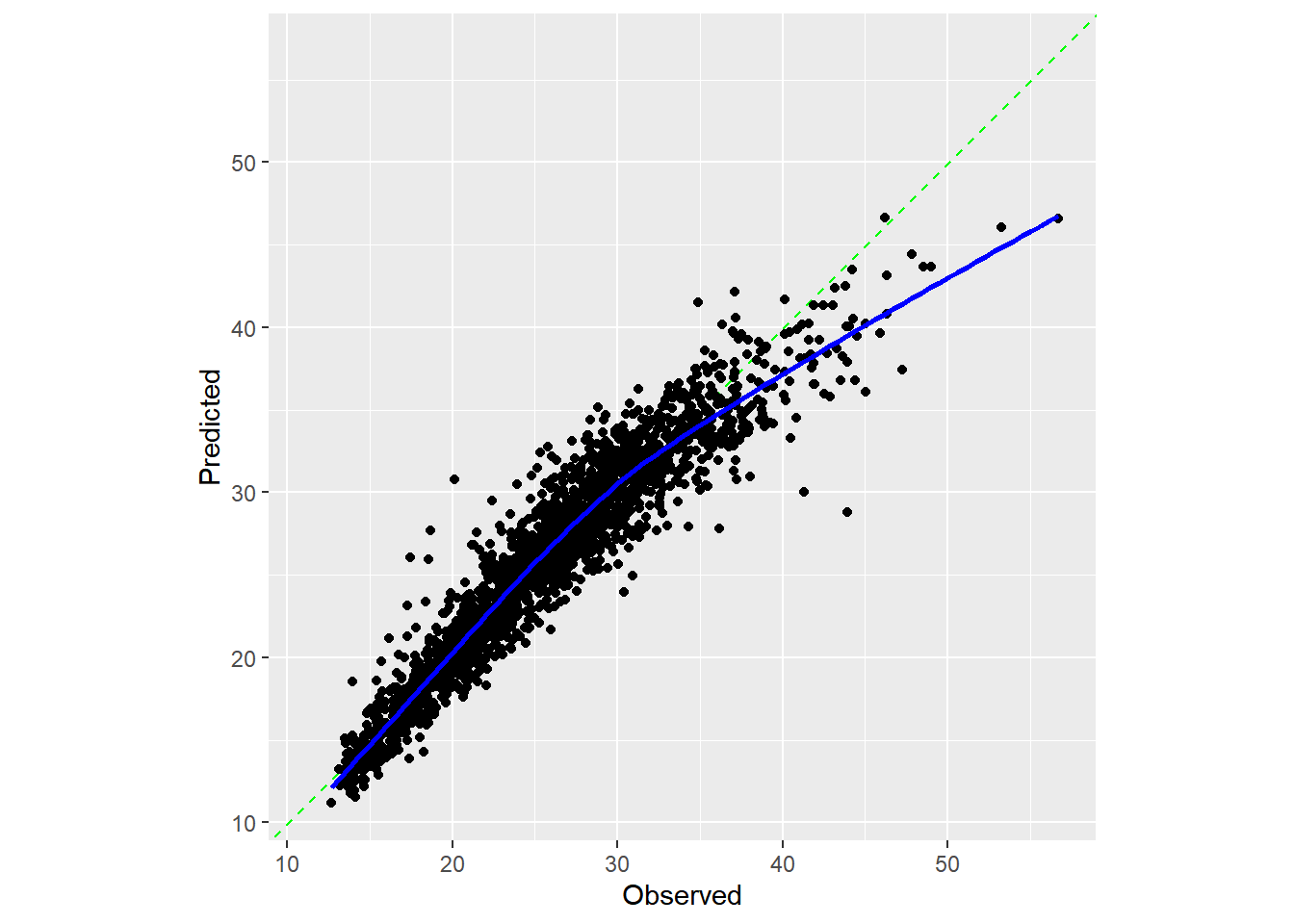
  • 最佳情况是数据点能紧密排列在对角线上。该模型对极短时长的配送预测略有不足,但对超过 40 分钟的配送则存在显著低估。不过总体而言,该模型对大多数配送情况都能有效运作。
  • 接下来的操作应该是重点分析预测效果不佳的样本,探究它们是否存在共同特征。例如:这些样本是否集中在周五晚间短距离订单等特定场景?若发现规律,我们将通过添加模型项来修正缺陷,并观察验证集均方误差(MAE)是否下降。整个过程将循环进行:先对残差进行探索性分析,再增减特征量,最后重新拟合模型。

27.9 测试集结果

lm_reg_fit <- fit(lm_reg_wflow, data = delivery_train)
lm_reg_test_pred <- augment(lm_reg_fit, new_data = delivery_test)
lm_reg_test_pred |>
  reg_metrics(truth = time_to_delivery, estimate = .pred)
# A tibble: 1 × 3
  .metric .estimator .estimate
  <chr>   <chr>          <dbl>
1 mae     standard        1.61
# plot the results
lm_reg_test_pred |> 
  cal_plot_regression(truth = time_to_delivery, estimate = .pred)

以上代码可以使用tune::last_fit()函数简化。

lm_reg_test_res <-
  lm_reg_wflow |>
  last_fit(delivery_split, metrics = reg_metrics)

# 提取评估指标
collect_metrics(lm_reg_test_res)
# A tibble: 1 × 4
  .metric .estimator .estimate .config        
  <chr>   <chr>          <dbl> <chr>          
1 mae     standard        1.61 pre0_mod0_post0
# 提取预测值
collect_predictions(lm_reg_test_res)
# A tibble: 2,004 × 5
   .pred id               time_to_delivery  .row .config        
   <dbl> <chr>                       <dbl> <int> <chr>          
 1  16.0 train/test split             18.0     7 pre0_mod0_post0
 2  16.0 train/test split             17.6    14 pre0_mod0_post0
 3  27.6 train/test split             26.7    16 pre0_mod0_post0
 4  17.2 train/test split             17.6    29 pre0_mod0_post0
 5  32.2 train/test split             32.2    33 pre0_mod0_post0
 6  20.2 train/test split             20.3    34 pre0_mod0_post0
 7  29.2 train/test split             30.5    35 pre0_mod0_post0
 8  18.8 train/test split             20.6    43 pre0_mod0_post0
 9  25.5 train/test split             24.9    44 pre0_mod0_post0
10  22.6 train/test split             22.3    49 pre0_mod0_post0
# ℹ 1,994 more rows
# final model fit
lm_reg_fit <- extract_fit_parsnip(lm_reg_test_res)
lm_reg_fit |>
  tidy()
# A tibble: 114 × 5
   term        estimate std.error statistic  p.value
   <chr>          <dbl>     <dbl>     <dbl>    <dbl>
 1 (Intercept)   13.3      1.58        8.42 4.66e-17
 2 item_01        1.24     0.103      12.1  3.50e-33
 3 item_02        0.646    0.0687      9.41 6.85e-21
 4 item_03        0.731    0.0691     10.6  6.46e-26
 5 item_04        0.282    0.0626      4.50 6.78e- 6
 6 item_05        0.584    0.0787      7.42 1.36e-13
 7 item_06        0.525    0.0720      7.29 3.46e-13
 8 item_07        0.506    0.0710      7.13 1.10e-12
 9 item_08        0.638    0.0672      9.49 3.42e-21
10 item_09        0.737    0.0758      9.72 3.51e-22
# ℹ 104 more rows
# plot the results
cal_plot_regression(lm_reg_test_res)

27.10 小节

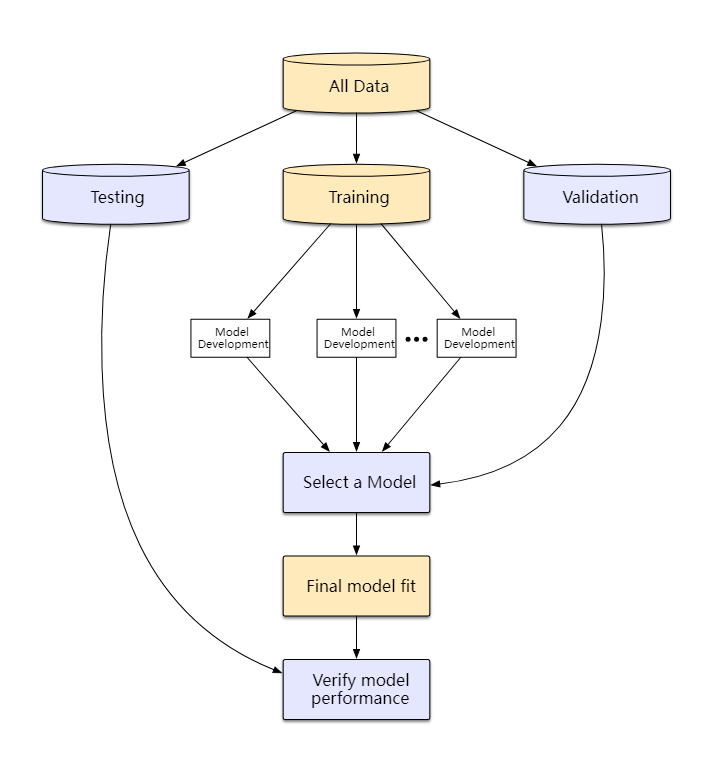
图 27.4: 创建预测模型过程图。 该图反映了哪些步骤使用测试集、验证集或整个训练集
  1. 数据划分:将数据集划分为训练集、验证集和测试集。训练集用于模型的训练,验证集用于模型的选择和调优,测试集用于评估最终模型的性能。

  2. EDA和特征工程:在训练集上进行探索性数据分析(EDA)以了解数据的结构和特征,并进行必要的特征工程来准备数据。

  3. 模型建立和选择:在训练集上建立多个候选模型,并使用验证集评估它们的性能,选择表现最好的模型。

  4. 模型评估:使用测试集(如果设定了验证集,则使用验证集,而使用测试集进行预测)评估最终选定模型的性能,以获得对模型在新数据上表现的无偏估计。


  1. \(MAE=\frac{1}{n}\sum_{i=1}^n|y_i-\hat{y}_i|\)↩︎

  2. \(R^2\) 是预测值与真实值的拟合优度指标,取值为 \(0\)\(1\) 之间,\(R^2\) 越接近 \(1\) ,说明模型的拟合程度越好。↩︎