30 数值变量转换
30.1 哪些是有问题的数值变量?合适应该应用哪些变换?
我们在处理单个数值变量时,通常会针对以下几种情况:
变量分布严重偏斜,通过一些变换可以使其更接近正态分布。常见的变换有对数变换(小节 30.2.1.1)、 Box-Cox变换(小节 30.2.1.2)、 Yeo-Johnson变换(小节 30.2.1.3) 、 百分位数变换(小节 30.2.1.4) 等。
变量的尺度问题,通过特征缩放(feature scaling)可以使变量更适合某些机器学习算法。常见的特征缩放方法有标准化(包括了中心化和缩放)(小节 30.2.2.1)、 最大最小值缩放(小节 30.2.2.2)、 Robust(小节 30.2.2.3) 等。
变量中存在非线性关系,通过分箱(小节 30.2.3.1)、 样条函数(分箱操作的延伸,弥补分箱技术丢失细节的缺陷) (小节 30.2.3.2) 、多项式(小节 30.2.3.3) 等方式可以捕捉非线性关系。
一些基于树的模型,如决策树、随机森林和梯度提升树, 对变量的分布和尺度不敏感, 因为它们通过递归地划分数据来建立模型,而不是依赖于变量的具体数值。因此,对于这些模型,通常不需要对数值变量进行变换或缩放。
30.2 具体变换方法
30.2.1 分布变换
30.2.1.1 对数变换
- 对数变换是处理高度偏态数据的工具。对数变换可以减小数据的范围,压缩较大的值,拉伸较小的值,从而使数据更接近正态分布,对于右偏分布1改善明显。
- 如果变量中存在0值或负值,则需要设定
offset参数,避免对零或负值取对数。
ames |>
  ggplot(aes(Lot_Area)) +
geom_histogram(bins = 30) # Lot_Area为右偏分布-1.png)
# define recipe
unskew_rec <- recipe(Sale_Price ~ ., data = ames) |>
  step_log(Lot_Area) |>
  prep()
unskew_rec

# use bake() to apply the transformation
baked_data <- unskew_rec |>
  bake(new_data = NULL)
# plot transformed variable
baked_data |>
  ggplot(aes(Lot_Area)) +
  geom_histogram(bins = 30) +
geom_rug(alpha = 0.5, length = unit(0.03, "npc"), linewidth = 0.5)-2.png)
30.2.1.2 Box-Cox变换
-
Box-Cox变换是一种参数化的幂变换,通过选择合适的参数 \(\lambda\),Box-Cox变换可以使数据更接近正态分布。 -
Box-Cox变换要求变量必须为正值,因此在应用前需要确保数据中没有零或负值。
# define and bake recipe
boxcox_rec <- recipe(Sale_Price ~ ., data = ames) |>
  step_BoxCox(Lot_Area) |>
  prep()
baked_data <- boxcox_rec |>
  bake(new_data = NULL)

# plot transformed variable
baked_data |>
  ggplot(aes(Lot_Area)) +
geom_histogram(bins = 30)-1.png)
30.2.1.3 Yeo-Johnson变换
Yeo-Johnson变换是Box-Cox变换的推广,适用于包含零或负值的数据。也就是说我们大部分时间可以直接使用Yeo-Johnson变换,而不需要担心数据中是否包含零或负值。Yeo-Johnson变换和Box-Cox变换对于均匀分布、双峰分布的数据效果不佳。
# define and bake recipe
yeojohnson_rec <- recipe(Sale_Price ~ ., data = ames) |>
  step_YeoJohnson(Lot_Area) |>
  prep()
baked_data <- yeojohnson_rec |>
  bake(new_data = NULL)

# plot transformed variable
baked_data |>
  ggplot(aes(Lot_Area)) +
  geom_histogram(bins = 30)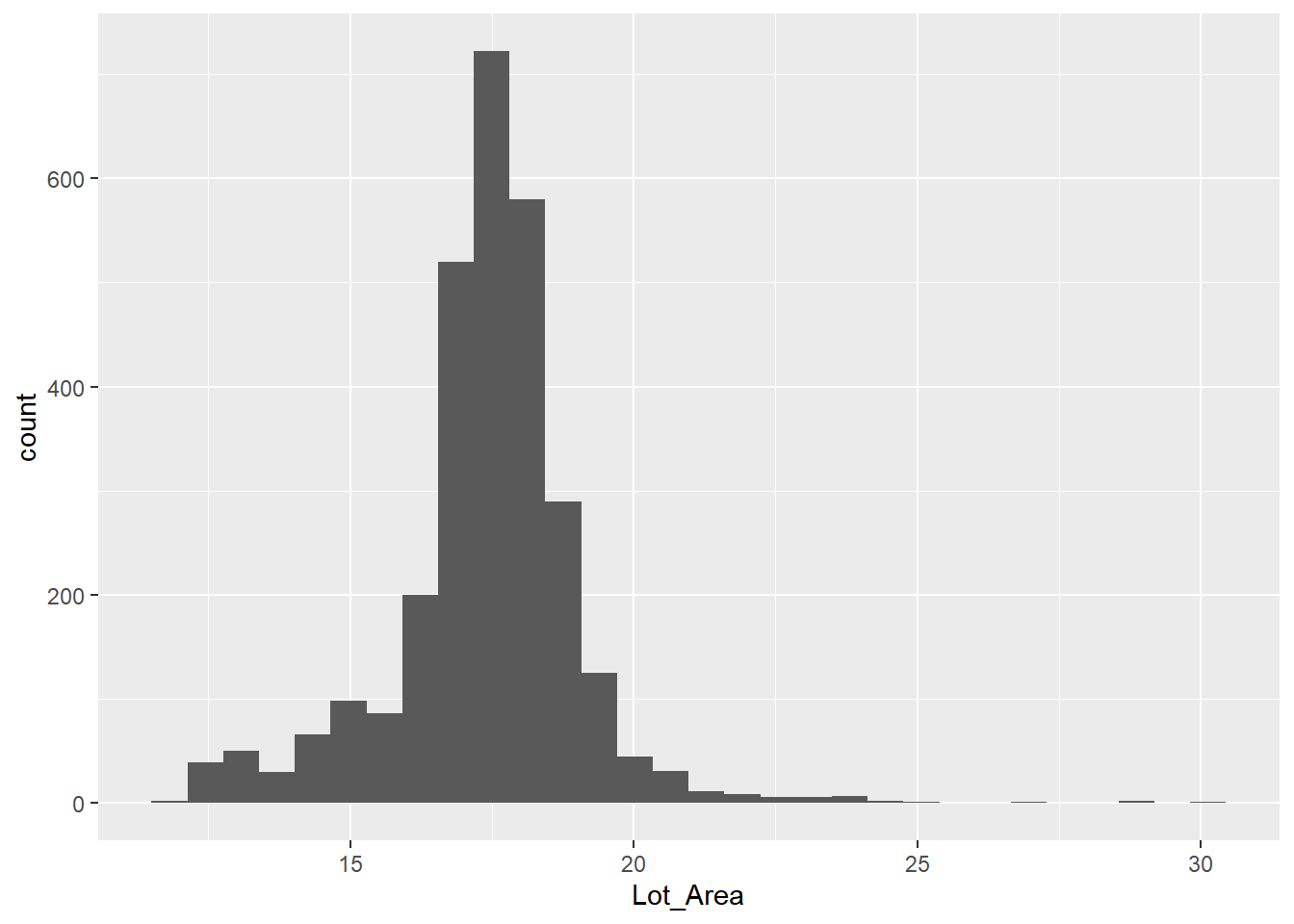
30.2.1.4 百分位数变换
百分位缩放(有时也称为秩缩放或分位数缩放)是一种对数据应用非线性变换的方法,其中每个值都是训练数据的百分位数。
这种方法的优点是它不受异常值的影响,因为它基于数据的排名而不是实际数值。通过将数据转换为百分位数,百分位缩放可以使数据更接近均匀分布,从而改善某些机器学习算法的性能。
# define and bake recipe
percentile_rec <- recipe(Sale_Price ~ ., data = ames) |>
  step_percentile(Lot_Area) |>
  prep()
baked_data <- percentile_rec |>
  bake(new_data = NULL)
# plot transformed variable
baked_data |>
  ggplot(aes(Lot_Area)) +
  geom_histogram(bins = 30)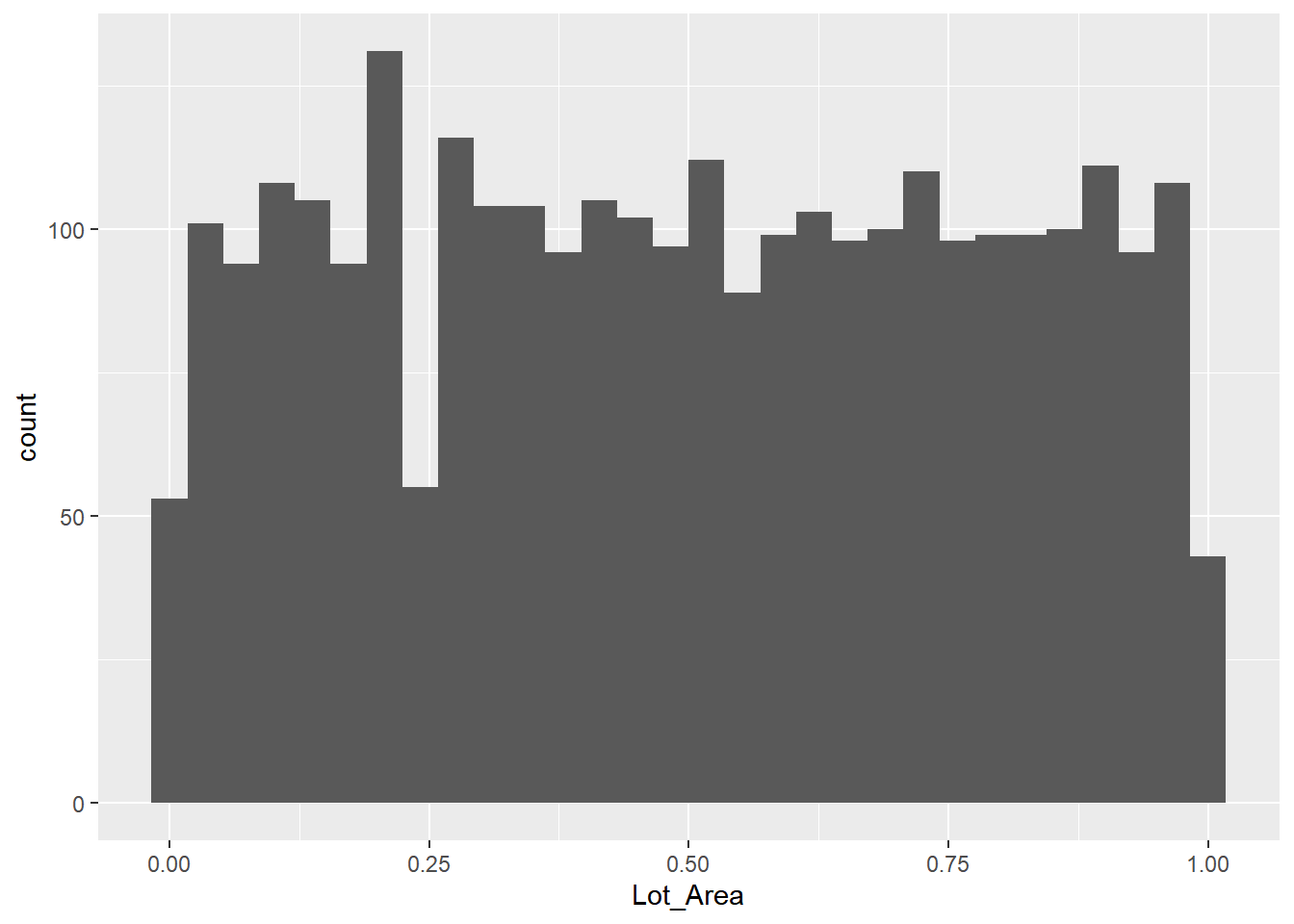
30.2.2 特征缩放
30.2.2.1 标准化
- 标准化是将变量转换为均值为0,标准差为1的分布。标准化可以使变量具有相同的尺度,从而提高某些机器学习算法的性能。
- 标准化不改变变量的分布形状,只会对变量进行尺度的缩放,因此对于高度偏态数据,标准化可能无法改善模型性能。此外,标准化对异常值敏感,异常值可能会显著影响均值和标准差的计算,从而影响标准化的结果。
- 标准化实际上是先进行
center(减去均值),然后进行scale(除以标准差)。
normalize_rec <- recipe(Sale_Price ~ ., data = ames) |>
  step_zv(all_numeric_predictors()) |> # 去除方差为0的数字型变量
  step_normalize(all_numeric_predictors()) |>
  prep()
baked_data <- normalize_rec |>
  bake(new_data = NULL) |>
  select(where(is.numeric))
baked_data
# A tibble: 2,930 × 34
Lot_Frontage Lot_Area Year_Built Year_Remod_Add Mas_Vnr_Area BsmtFin_SF_1
<dbl> <dbl> <dbl> <dbl> <dbl> <dbl>
1 2.49 2.74 -0.375 -1.16 0.0610 -0.975
2 0.667 0.187 -0.342 -1.12 -0.566 0.816
3 0.697 0.523 -0.442 -1.26 0.0386 -1.42
4 1.06 0.128 -0.111 -0.780 -0.566 -1.42
5 0.488 0.467 0.848 0.658 -0.566 -0.527
6 0.608 -0.0216 0.881 0.658 -0.454 -0.527
7 -0.497 -0.663 0.980 0.802 -0.566 -0.527
8 -0.437 -0.653 0.683 0.371 -0.566 -1.42
9 -0.557 -0.604 0.782 0.562 -0.566 -0.527
10 0.0702 -0.336 0.914 0.706 -0.566 1.26
# ℹ 2,920 more rows
# ℹ 28 more variables: BsmtFin_SF_2 <dbl>, Bsmt_Unf_SF <dbl>,
# Total_Bsmt_SF <dbl>, First_Flr_SF <dbl>, Second_Flr_SF <dbl>,
# Gr_Liv_Area <dbl>, Bsmt_Full_Bath <dbl>, Bsmt_Half_Bath <dbl>,
# Full_Bath <dbl>, Half_Bath <dbl>, Bedroom_AbvGr <dbl>, Kitchen_AbvGr <dbl>,
# TotRms_AbvGrd <dbl>, Fireplaces <dbl>, Garage_Cars <dbl>,
# Garage_Area <dbl>, Wood_Deck_SF <dbl>, Open_Porch_SF <dbl>, …30.2.2.2 最大最小值缩放
最大最小值缩放的核心目的是将变量压缩至预定义的区间范围内,通常为 \([0, 1]\),以消除因量纲不同或数值范围差异带来的影响。
range_rec <- recipe(Sale_Price ~ ., data = ames) |>
  step_range(all_numeric_predictors()) |>
  prep()
baked_data <- range_rec |>
  bake(new_data = NULL) |>
  select(where(is.numeric))
baked_data
# A tibble: 2,930 × 34
Lot_Frontage Lot_Area Year_Built Year_Remod_Add Mas_Vnr_Area BsmtFin_SF_1
<dbl> <dbl> <dbl> <dbl> <dbl> <dbl>
1 0.450 0.142 0.638 0.167 0.07 0.286
2 0.256 0.0482 0.645 0.183 0 0.857
3 0.259 0.0606 0.623 0.133 0.0675 0.143
4 0.297 0.0461 0.696 0.3 0 0.143
5 0.236 0.0586 0.906 0.8 0 0.429
6 0.249 0.0406 0.913 0.8 0.0125 0.429
7 0.131 0.0169 0.935 0.85 0 0.429
8 0.137 0.0173 0.870 0.7 0 0.143
9 0.125 0.0191 0.891 0.767 0 0.429
10 0.192 0.0290 0.920 0.817 0 1
# ℹ 2,920 more rows
# ℹ 28 more variables: BsmtFin_SF_2 <dbl>, Bsmt_Unf_SF <dbl>,
# Total_Bsmt_SF <dbl>, First_Flr_SF <dbl>, Second_Flr_SF <dbl>,
# Gr_Liv_Area <dbl>, Bsmt_Full_Bath <dbl>, Bsmt_Half_Bath <dbl>,
# Full_Bath <dbl>, Half_Bath <dbl>, Bedroom_AbvGr <dbl>, Kitchen_AbvGr <dbl>,
# TotRms_AbvGrd <dbl>, Fireplaces <dbl>, Garage_Cars <dbl>,
# Garage_Area <dbl>, Wood_Deck_SF <dbl>, Open_Porch_SF <dbl>, …30.2.2.3 Robust
- 与标准化类似,稳健缩放是通过先减去中位数,然后除以四分位距2来实现的。
- 与标准化不同,稳健缩放不依赖与均值和方差,不受异常值的影响,但在方差接近0的数据无法使用(\(Q1(x) - Q3(x) = 0\))。
- 稳健缩放的方法不在
tidymodels默认加载的包中,需要调用extrasteps包。
robust_rec <- recipe(Sale_Price ~ ., data = ames) |>
  extrasteps::step_robust(all_numeric_predictors()) |>
  prep()
baked_data <- robust_rec |>
  bake(new_data = NULL) |>
  select(where(is.numeric))
baked_data
# A tibble: 2,930 × 34
Lot_Frontage Lot_Area Year_Built Year_Remod_Add Mas_Vnr_Area BsmtFin_SF_1
<dbl> <dbl> <dbl> <dbl> <dbl> <dbl>
1 2.23 5.43 -0.277 -0.846 0.688 -0.25
2 0.486 0.531 -0.255 -0.821 0 0.75
3 0.514 1.17 -0.319 -0.897 0.664 -0.5
4 0.857 0.419 -0.106 -0.641 0 -0.5
5 0.314 1.07 0.511 0.128 0 0
6 0.429 0.132 0.532 0.128 0.123 0
7 -0.629 -1.10 0.596 0.205 0 0
8 -0.571 -1.08 0.404 -0.0256 0 -0.5
9 -0.686 -0.984 0.468 0.0769 0 0
10 -0.0857 -0.471 0.553 0.154 0 1
# ℹ 2,920 more rows
# ℹ 28 more variables: BsmtFin_SF_2 <dbl>, Bsmt_Unf_SF <dbl>,
# Total_Bsmt_SF <dbl>, First_Flr_SF <dbl>, Second_Flr_SF <dbl>,
# Gr_Liv_Area <dbl>, Bsmt_Full_Bath <dbl>, Bsmt_Half_Bath <dbl>,
# Full_Bath <dbl>, Half_Bath <dbl>, Bedroom_AbvGr <dbl>, Kitchen_AbvGr <dbl>,
# TotRms_AbvGrd <dbl>, Fireplaces <dbl>, Garage_Cars <dbl>,
# Garage_Area <dbl>, Wood_Deck_SF <dbl>, Open_Porch_SF <dbl>, …30.2.3 非线性关系
30.2.3.1 分箱-binning
- 分箱本质是将连续的 “数值变量曲线”(比如年龄、收入这类连续数据的分布趋势)拆分成多个离散的 “区间段”(即 “箱”),把原本连续的数值关系转化为更易处理的区间关系。
- 分箱可以解决 “非线性关系建模难” 的问题:很多模型(如线性回归)天生只能处理预测变量(如年龄)和结果(如消费金额)之间的线性关系,而分箱能将两者间的非线性趋势(比如 “20-30 岁消费增长快,30-45 岁增长平缓”)拆解成多个区间的线性关系,让模型可识别。
binning_rec <- recipe(Sale_Price ~ ., data = ames) |>
  step_discretize(Lot_Area) |> # 创建一个因子变量
  step_dummy(Lot_Area) |> # 将因子变量转换为哑变量
  prep()
baked_data <- binning_rec |>
  bake(new_data = NULL)
baked_data |>
  select(starts_with("Lot_Area")) |>
  glimpse()
Rows: 2,930
Columns: 3
$ Lot_Area_bin2 <dbl> 0, 0, 0, 0, 0, 0, 0, 0, 0, 1, 0, 1, 1, 0, 0, 0, 0, 0, 0,…
$ Lot_Area_bin3 <dbl> 0, 0, 0, 1, 0, 1, 0, 0, 0, 0, 1, 0, 0, 1, 0, 0, 0, 1, 0,…
$ Lot_Area_bin4 <dbl> 1, 1, 1, 0, 1, 0, 0, 0, 0, 0, 0, 0, 0, 0, 0, 1, 1, 0, 1,…30.2.3.2 样条函数-splines
- 可将与目标变量存在非线性关系的数值型预测变量,转化为1个或多个与目标变量呈线性关系的变量。
- 转换后会产生相关特征(相邻特征高度相关,间隔较远特征呈负相关),需结合 “相关数据处理” 模块方法优化(如高相关性过滤)。
- 使用样条函数有以下几点需要注意:
- 自由度(
deg_free)需谨慎选择:过小可能欠拟合,过大可能过拟合(可通过交叉验证优化)。 - 样条会增加特征维度(如自由度为 5 会生成 5 个基函数),但
tidymodels会自动处理。 - 自然样条(
step_ns())比 B样条 更稳健,尤其在数据范围外的外推场景。
- 自由度(
样条项:指的是用分段低次多项式函数来拟合预测变量与响应变量之间的非线性关系,比简单地加入多项式项(如 \(x^2\)、\(x^3\))更灵活、更不容易在数据边界处震荡。
样条函数的精髓在于它提供了一个在灵活性与稳定性之间找到最佳平衡点的框架。它通过分段拟合和平滑约束,克服了单一多项式模型的震荡问题,又能比参数模型捕捉到更复杂的数据模式。
对于我们日常处理的生态与环境数据,样条函数是处理非线性关系(如物种对温度、降水的响应)时一个不可或缺且强大的工具。
样条项可以通过step_ns()函数在recipe中添加。step_ns()函数的几个要点:
-
deg_free(自由度)控制样条的“弯曲程度”:自由度越大,拟合越灵活,但也越容易过拟合;自由度为 1 时退化为直线。 - 样条项通常只对连续型预测变量使用,且事先应通过
EDA(比如观察残差图或预测变量与响应的散点图)判断是否存在非线性关系,再决定是否加入。 - 加入样条项后,模型仍是线性模型(对参数是线性的),只是对预测变量做了非线性的基函数展开,所以依然可以用
linear_reg()来拟合。 - 通常与
step_normalize()、step_dummy()等其他预处理步骤放在同一个 recipe 中,注意样条变换应放在归一化之后(如果做归一化),并且要在训练集上prep(),再应用到验证集/测试集,避免数据泄漏。
Rows: 2,930
Columns: 7
$ Lot_Area      <int> 31770, 11622, 14267, 11160, 13830, 9978, 4920, 5005, 538…
$ Lot_Area_ns_1 <dbl> 0.000000e+00, 0.000000e+00, 0.000000e+00, 0.000000e+00, …
$ Lot_Area_ns_2 <dbl> 0.0000000000, 0.0474691990, 0.0000000000, 0.1309374466, …
$ Lot_Area_ns_3 <dbl> 0.7245485215, 0.9418727536, 0.9523187732, 0.8632741726, …
$ Lot_Area_ns_4 <dbl> 0.2159072922, 0.0088951108, 0.0395697635, 0.0048329027, …
$ Lot_Area_ns_5 <dbl> 9.139338e-02, 3.534438e-03, 1.581289e-02, 1.919545e-03, …
$ Lot_Area_ns_6 <dbl> -3.184920e-02, -1.771501e-03, -7.701424e-03, -9.640667e-…
# visualize the basis functions
spline_rec |>
bake(new_data = NULL) |>
pivot_longer(
c(starts_with("Lot_Area_ns_")),
names_to = "feature",
values_to = "value"
) |>
mutate(feature = gsub("Lot_Area_ns_", "feature ", feature)) |>
ggplot(aes(Lot_Area, value, color = feature)) +
geom_line() +
facet_wrap(vars(feature))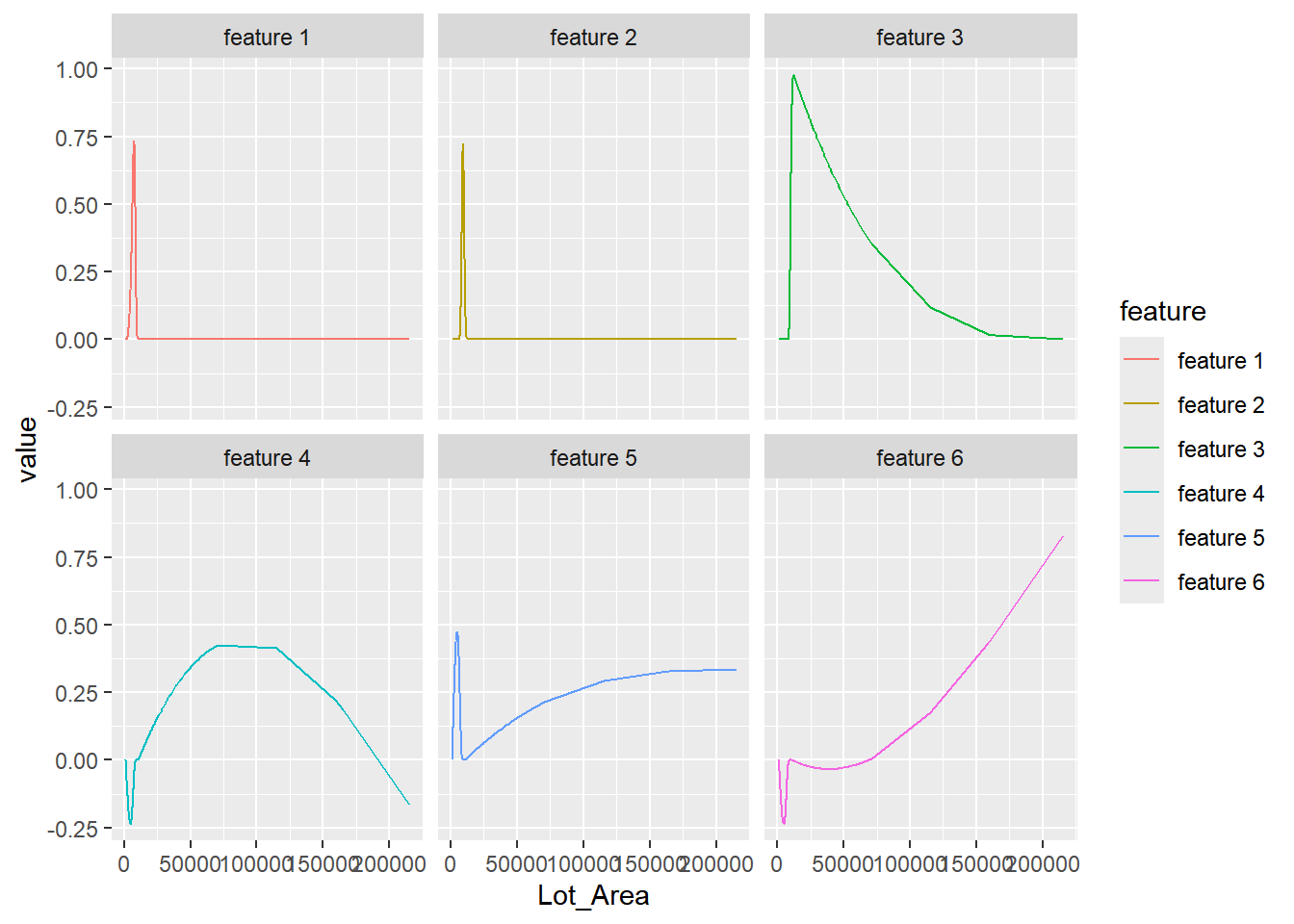
上图中:
- 每条曲线代表一个样条基函数,所有基函数的线性组合可以拟合原始变量与目标变量之间的非线性关系。
- 曲线的形状反映了基函数在该区域对预测的影响:
- 基函数值大的区间,表示该基函数对最终曲线贡献较大。
- 基函数的非零区域互相重叠,共同形成平滑的整体趋势。
30.2.3.3 多项式-polynomials
许多模型无法直接处理非线性关系,多项式展开可将与目标变量呈非线性关系的数值变量,转化为一个或多个与目标变量呈线性关系的变量,助力模型有效建模。
与分箱和样条一样,多项式展开也是一种非线性关系转化为线性关系。它的优点是不会像样条那样增加太多特征维度(假设原始变量为 \(x\),多项式展开后只会生成 \(x^2, x^3, \ldots, x^d\) 这 \(d-1\) 个新变量),但缺点是无法像样条那样灵活拟合复杂的非线性关系,其可解释性也不及样条。
Rows: 2,930
Columns: 4
$ Lot_Area        <int> 31770, 11622, 14267, 11160, 13830, 9978, 4920, 5005, 5…
$ Lot_Area_poly_1 <dbl> 5.070030e-02, 3.456477e-03, 9.658577e-03, 2.373161e-03…
$ Lot_Area_poly_2 <dbl> -0.052288355, -0.006139895, -0.013560043, -0.004801598…
$ Lot_Area_poly_3 <dbl> 0.0024951091, 0.0067956902, 0.0110336270, 0.0058890125…
30.2.4 空间符号
“空间符号”(Spatial Sign)是一种针对多个数值预测变量联合的投影变换,主要用来处理多变量异常值(multivariate outliers)问题。其数学定义很简单:对于一组预测变量构成的向量 \(x = (x_1, x_2, \dots, x_p)\)(通常先做过居中和标准化),空间符号变换把它投影到单位球面上,其计算公式如 ?eq-eq-spatial-sign 所示。
\[ x_{ij}^* = \frac{x_{ij}}{\sum_{j=1}^p x_{ij}^2} \tag{30.1}\]
空间符号有几个要点:
- 目的:压制多变量异常值的影响。普通的单变量异常值处理(如截尾、分箱)只看单个变量,但有些样本在单变量上并不极端,组合起来却远离数据主体(多变量异常值)。空间符号把所有样本”拉”到同一个球面上,异常样本不再因为数值过大而对模型(尤其是基于距离或线性组合的方法,如 PCA、KNN、线性回归)产生过大影响。
-
前提:通常需要先对变量做居中和标准化(
step_normalize()),否则不同量纲的变量会主导范数计算。 -
联合变换:空间符号是对一组变量整体进行变换(结果同时依赖所有输入变量的取值),不像
Box-Cox、Yeo-Johnson那样逐个变量独立处理,所以变换后的单个变量已经失去了原始的可解释意义。 - 适用场景:适用于多变量异常值明显、且希望保留原始变量信息的情况。对于单个变量的异常值,普通的截尾或分箱可能更直观。
-
tidymodels 实现:使用
recipe::step_spatialsign()自动处理多变量异常值问题,这个函数将两个或多个数值列投影到多维超球面上,生成的数据列名与输入列名相同。