library(tidyverse)
library(tidymodels)
tidymodels::tidymodels_prefer()

data(ames)
ames <- ames |>
  mutate(Sale_Price = log10(Sale_Price))

set.seed(502)
ames_split <- initial_split(ames, prop = 0.80, strata = Sale_Price)
ames_train <- training(ames_split)
ames_test <- testing(ames_split)

lm_model <- linear_reg() |>
set_engine("lm")28 模型工作流
-
workflow中的
workflow()对象的目的是为了将建模过程中的主要步骤 (图 28.1) 进行整合。
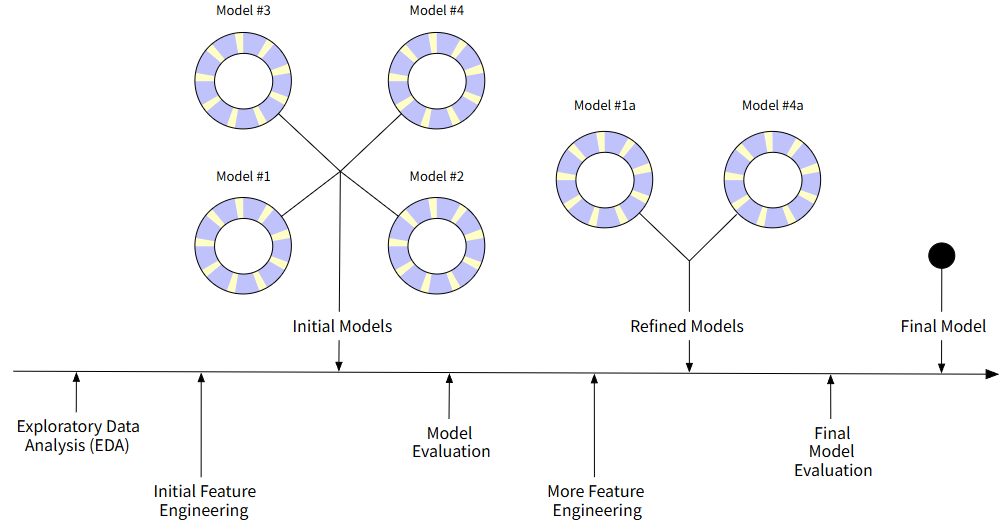
-
workflow()的重要性体现在将数据预处理和模型拟合整合在一起,保证了预处理正确性和流程一致性。- 防止数据泄露:预处理步骤(标准化、PCA、插补等)随 workflow 进入每折重采样,每折单独估计均值/方差,而不是用全训练集的统计量——这是手工流程最容易犯的错。
-
统一接口:同一个
workflow对象贯穿全程:tune_grid()→tune_bayes()→select_best()→finalize_workflow()→last_fit()→extract_workflow(),无需中途手动拼装。 -
预处理与模型紧密结合:调参时评估的是预处理 + 模型的组合表现;换
recipe或换模型只改一处,不会出现预处理对了模型忘了改的不一致。 -
可复现、可部署:整个
workflow是一个可序列化对象,生产环境直接使用predict(workflow_obj, new_data),新数据自动走同样的预处理。
workflow 是 tidymodels 保证“预处理正确性”和“流程一致性”的载体,没有它,重采样和调参的正确性都无从谈起。
28.1 workflow基础
lm_wflow <- workflow() |>
  add_model(lm_model)
lm_wflow
══ Workflow ════════════════════════════════════════════════════════════════════
Preprocessor: None
Model: linear_reg()
── Model ───────────────────────────────────────────────────────────────────────
Linear Regression Model Specification (regression)
Computational engine: lm lm_wwflow就是一个基本的workflow对象,此对象中包含了Model(模型),但还未包含任何预处理步骤:Preprocessor: None。
lm_wflow <- lm_wflow |>
  add_formula(Sale_Price ~ Longitude + Latitude) # 使用公式作为预处理器
lm_wflow
══ Workflow ════════════════════════════════════════════════════════════════════
Preprocessor: Formula
Model: linear_reg()
── Preprocessor ────────────────────────────────────────────────────────────────
Sale_Price ~ Longitude + Latitude
── Model ───────────────────────────────────────────────────────────────────────
Linear Regression Model Specification (regression)
Computational engine: lm 再添加了预处理器后,就可以使用fit()函数对模型进行拟合,并进行下一步的预测。注意,拟合模型需要使用训练数据集,预测则需要使用测试集。
# fit
lm_fit <- fit(lm_wflow, ames_train)
lm_fit
══ Workflow [trained] ══════════════════════════════════════════════════════════
Preprocessor: Formula
Model: linear_reg()
── Preprocessor ────────────────────────────────────────────────────────────────
Sale_Price ~ Longitude + Latitude
── Model ───────────────────────────────────────────────────────────────────────
Call:
stats::lm(formula = ..y ~ ., data = data)
Coefficients:
(Intercept) Longitude Latitude
-302.974 -2.075 2.710 # predict
predict(lm_fit, new_data = ames_test) |>
tidy()# A tibble: 1 × 13
column n mean sd median trimmed mad min max range skew
<chr> <dbl> <dbl> <dbl> <dbl> <dbl> <dbl> <dbl> <dbl> <dbl> <dbl>
1 .pred 588 5.22 0.0710 5.24 5.23 0.0476 5.01 5.33 0.316 -0.950
# ℹ 2 more variables: kurtosis <dbl>, se <dbl>-
lm_fit的输出结果显示Workflow [trained],表示已经完成训练。
提示
- 可以使用
update_formula()公式对workflow()中的预处理公式进行变更。 - 在 章节 29 中,会介绍如何将更丰富的预处理步骤添加至
workflow中。
28.1.1 workflow中使用特殊公式和行内公式
针对比较复杂的公式,例如Sex + (age | Subject),在R无法正确识别的问题,workflow包采用如下解决的方式:
- 使用
add_variables()函数将原始变量传入模型。 - 使用
add_model()使用实际的公式。 - 以上方式相当于使用了一个辅助公式对原始变量进行预处理。
library(multilevelmod) # 加载多层线性模型包
library(nlme) # 加载nlme包,使用Orthodont数据集

multilevel_spec <- linear_reg() |>
  set_engine("lmer") # 设置多层线性模型的引擎为lmer

multilevel_wflow <- workflow() |>
  add_variables(outcome = distance, predictors = c(Sex, age, Subject)) |>
  add_model(multilevel_spec, formula = distance ~ Sex + (age | Subject))

multilevel_fit <- fit(multilevel_wflow, data = Orthodont)
multilevel_fit
══ Workflow [trained] ══════════════════════════════════════════════════════════
Preprocessor: Variables
Model: linear_reg()
── Preprocessor ────────────────────────────────────────────────────────────────
Outcomes: distance
Predictors: c(Sex, age, Subject)
── Model ───────────────────────────────────────────────────────────────────────
Linear mixed model fit by REML ['lmerMod']
Formula: distance ~ Sex + (age | Subject)
Data: data
REML criterion at convergence: 471.1635
Random effects:
Groups Name Std.Dev. Corr
Subject (Intercept) 7.3912
age 0.6943 -0.97
Residual 1.3100
Number of obs: 108, groups: Subject, 27
Fixed Effects:
(Intercept) SexFemale
24.517 -2.145 28.2 同时创建多个workflow
workflowsets 是tidymodels的重要工具,特别适合“比较多种预处理 × 多种模型”的场景,是 tidymodels 里做「模型选择」的核心组织方式。可以让我们让一次管理、评估和对比多个候选 workflow,避免重复代码和管理混乱。
workflowsets还会和重抽样一起使用,将在 章节 39 中进行详细讨论。例如,我们想了解ames数据集中房屋位置对价格的影响:
# 创建多个房屋位置变量公式
location <- list(
  longitude = Sale_Price ~ Longitude,
  latitude = Sale_Price ~ Latitude,
  coords = Sale_Price ~ Longitude + Latitude,
  neighborhood = Sale_Price ~ Neighborhood
)

# 使用workflow_sets()将location中不用的位置变量公式组合
library(workflowsets)
location_models <- workflow_set(
  preproc = location,
  models = list(lm = lm_model)
)
location_models
# A workflow set/tibble: 4 × 4
wflow_id info option result
<chr> <list> <list> <list>
1 longitude_lm <tibble [1 × 4]> <opts[0]> <list [0]>
2 latitude_lm <tibble [1 × 4]> <opts[0]> <list [0]>
3 coords_lm <tibble [1 × 4]> <opts[0]> <list [0]>
4 neighborhood_lm <tibble [1 × 4]> <opts[0]> <list [0]>location_models$info[[1]] # 看的是"这个组合用了什么"的摘要。# A tibble: 1 × 4
workflow preproc model comment
<list> <chr> <chr> <chr>
1 <workflow> formula linear_reg "" extract_workflow(location_models, id = "coords_lm") # 提取id为`corrds_lm"的workflow。══ Workflow ════════════════════════════════════════════════════════════════════
Preprocessor: Formula
Model: linear_reg()
── Preprocessor ────────────────────────────────────────────────────────────────
Sale_Price ~ Longitude + Latitude
── Model ───────────────────────────────────────────────────────────────────────
Linear Regression Model Specification (regression)
Computational engine: lm 我们将在 (set-comcomparing-models?) 中介绍更多关于workflowsets的详细用法和优势。
28.3 使用测试集评估模型
如果我们已经完成了模型的开发并确定了最终模型,就可以使用last_fit()函数在测试集上评估模型的性能。last_fit()函数会使用训练集拟合模型,并在测试集上进行预测和评估。
last_fit()函数使用数据划分对象作为输入,而不是使用数据框。该函数允许我们在不重复代码的情况下,使用数据划分对象生成用于最终拟合和评估的训练集和测试集,对多个模型进行统一的评估和比较。final_lm_res <- last_fit(lm_wflow, ames_split)
final_lm_res# Resampling results
# Manual resampling
# A tibble: 1 × 6
splits id .metrics .notes .predictions .workflow
<list> <chr> <list> <list> <list> <list>
1 <split [2342/588]> train/test split <tibble> <tibble> <tibble> <workflow>fitted_lm_wflow <- extract_workflow(final_lm_res) # 提取最终拟合的workflow
fitted_lm_wflow══ Workflow [trained] ══════════════════════════════════════════════════════════
Preprocessor: Formula
Model: linear_reg()
── Preprocessor ────────────────────────────────────────────────────────────────
Sale_Price ~ Longitude + Latitude
── Model ───────────────────────────────────────────────────────────────────────
Call:
stats::lm(formula = ..y ~ ., data = data)
Coefficients:
(Intercept) Longitude Latitude
-302.974 -2.075 2.710 collect_metrics(final_lm_res) # 收集最终模型的性能评估指标# A tibble: 2 × 4
.metric .estimator .estimate .config
<chr> <chr> <dbl> <chr>
1 rmse standard 0.164 pre0_mod0_post0
2 rsq standard 0.189 pre0_mod0_post0collect_predictions(final_lm_res) |> slice(1:5) # 收集最终模型的预测结果(前5行)# A tibble: 5 × 5
.pred id Sale_Price .row .config
<dbl> <chr> <dbl> <int> <chr>
1 5.22 train/test split 5.02 2 pre0_mod0_post0
2 5.21 train/test split 5.39 4 pre0_mod0_post0
3 5.28 train/test split 5.28 5 pre0_mod0_post0
4 5.27 train/test split 5.28 8 pre0_mod0_post0
5 5.28 train/test split 5.28 10 pre0_mod0_post0